Linux 集群

2019-06-12-集群

Linux 集群

1.liunx 集群概述:

1.1 集群概念:

一组协同工作的服务器,对外表现为一个整体,更好的利用现有资源实现服务的高度可用

1.2 集群(Cluster)的分类:

  • LBC(Load Balancing):负载均衡集群
    • 减轻单台服务器的压力,将用户请求分担给多台主机一起处理
    • 实现方法:
  • HAC(High Availiablity):高可用集群
    • 最大限度的保证用户的应用持久,不间断的提供服务
    • 实现原理:心跳检测
    • 实现方法:
      • 软件:heartbeat linux-HA、RHCS、ROSE、keepalived
      • 硬件:F5
  • HPC(High-performance computing):高性能运算集群
2.负载均衡集群(LBC)

2.1LVS 相关原理:

LVS 运行在系统内核空间netfilterINPUT钩子上的框架,用户空间无法直接管理,用IPVSADM命令行工具管理集群服务;根据用户请求的套接字判断,分流至真实服务器的工作模块

  • 管理集群服务: 增、改、删
    1
    2
    3
    4
    ipvsadm -A|E -t|u|f service-address [-s,scheduler] [-p [timeout]]  
    ipvsadm -D -t|u|f service-address
    service-address: -t|u|f
    -s,scheduler: # 指定集群调度算法, 默认:WLC
  • 管理集群的RS: 增、改、删
    1
    2
    ipvsadm -a|e -t|u|f service-address -r service-address [-g|i|m] [-w,weight]  
    ipvsadm -d -t|u|f service-address -r service-address

2.2LVS工作模式:
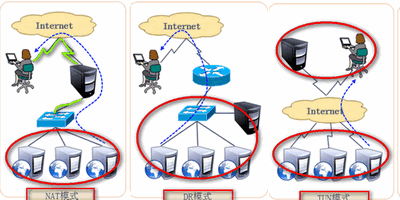
  • NAT(多目标的DNAT) ✔
    • 模式特点:
      • 网络层,替换目标地址;
      • 集群节点,必须在一个网络中;
      • 真实服务器网关必须指向负载调度器;
      • RIP通常都是私有IP,仅用于各个集群节点通信;
      • 负载调度器必须位于客户端和真实服务器之间,充当网关;
      • 支持端口映射,负载调度器操作系统必须是Linux ,真实服务器可以使用任意系统;


  • DR(Direct Routing) ✔
    • 模式特点:
      • 数据链路层,更改MAC地址,关闭ARP广播;
      • 集群节点,必须在一个网络中;
      • 真实服务器网关指向路由器;
      • RIP既可以是私网地址,又可以是公网地址;
      • 不支持端口映射;
  • TUN
    • 模式特点:
      • 集群节点不必位于同一个物理网络但必须都拥有公网IP(或都可以被路由)
      • 真实服务器不能将网管指向负载调度器
      • RIP必须是公网地址
      • 负载调度器只负责入站请求
      • 不支持端口映射功能
      • 发送方和接收方必须支持隧道功能

3.集群通用算法

3.1静态调度算法:

  • RR 轮询算法:第一台服务器开始到N台结束,然后循环 :laughing:
  • WRR 加权算法:按权重比例实现多台主机之间进行调度 :smile:
  • SH 源地址散列:将同一个IP用户请求,发送给同一个服务器
  • DH 目标地址散列:将同一个目标地址的用户请求发送给通一个真实服务器(提高缓存服务率)

3.2动态调度算法:

  • LC:Lest-connection,最少连接,将新的连接请求,分配给连接数最少的服务器 :smile:
    • 活动连接*256 + 非活动连接
  • WLC:加权最少连接,特殊的LC算法,权重越大承担请求越多 :smile:
    • (活动连接*256 + 非活动连接)/ 权重
  • SED:最短期望延迟,特殊的WLC算法
    • (活动连接 + 1)*256 / 权重
  • NQ:无需等待,特殊的SED算法,若有正是服务器的连接数等于0就直接分配不需要运算
  • LBLC:特殊的DH算法,即提高缓存命中率,有考虑了服务器性能
  • LBLCR:LBLCR缓存,尽可能提高负载均衡和缓存命中率折中方案

3.3持久化连接(类似于SH优先级最高)

  • PCC:持久客户端连接
    • 将来自于同一个客户端的所有请求统统定向此前选定的RS,只要IP相同,分配的服务器始终相同
  • PPC:持久端口连接
    • 将来自于同一个客户端对同一个服务(端口)的请求,始终定向此前选定的RS
  • PMFC:持久防火墙标记连接
    • 将来自同一个客户端指定服务(端口)的请求,始终定向至此选定的RS,不过它可以将2个不相关的端口定义为一个集群服务

3.4ipvsadm编译安装

1
2
3
4
5
wget -c http://www.linuxvirtualserver.org/software/kernel-2.6/ipvsadm-1.24.tar.gz
ln -s /usr/local/kernels/2.6.* /usr/local/linux
tar -xzvf ipvsadm-1.24.tar.gz
cd ipvsadm-1.24
make && make install
ipvsadm 命令选项 说明
-A 添加虚拟服务器IP
-s 设置调度算法
-a 添加真实主机
-t TCP_PORT
-u UDP_PORT
-f 标记
-g DR模式(直接路由)
-m NAT模式
-i TUN模式
-w 权重
-Ln 以数字形式输出地址和端口
-nS 重定向保存文件
-restore 恢复
-C 清空定义所有内容
-Z 清空计数器

4.LVS工作模式构建:

4.1 NAT 模式构建:

1
2
3
4
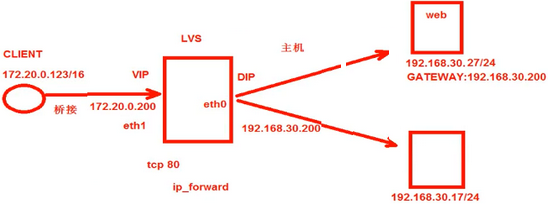
# Client: 172.20.0.123/16  
# LVS: eth1:VIP:172.20.0.200 eth0:DIP:192.168.30.200
# RS: 192.168.30.27/24 192.168.30.17/24 GW: 192.168.30.200
# /etc/pki/tls/certs

4.2负载调度器配置(VIP,DIP):

1
2
3
4
5
6
7
8
9
10
11
12
13
14
15
16
17
18
[root@xy ~]# vim /etc/sysctl.conf  # 开启负载调度器路由转发   
net.ipv4.ip_forward=1
[root@xy ~]# sysctl -p # 刷新内核参数
[root@xy ~]# service iptables start # 开启防火墙
[root@xy ~]# chkconfig iptables on
[root@xy ~]# iptables -F # 清空防火墙默认规则
[root@xy ~]# iptables -t nat -A POSTROUTING -s 192.168.30.27 -o eth0 -j SNAT -to-source 172.20.0.100
[root@xy ~]# iptables -t nat -L
[root@xy ~]# ipvsadm -A -t 172.20.0.200:80 -s rr # 添加 ipvsadm TCP集群
[root@xy ~]# ipvsadm -a -t 172.20.0.200:80 -r 192.168.30.17:8080 -m
# 添加ipvsadm节点 -m NAT 模式
[root@xy ~]# ipvsadm -a -t 172.20.0.200:80 -r 192.168.30.27:80 -m
[root@xy ~]# ipvsadm -Ln
[root@xy ~]# service ipvsadm save
[root@xy ~]# chkconfig ipvsadm on

[root@xy ~]# ipvsadm -Ln --status # 查看集群状态
[root@xy ~]# ipvsadm -D -t 外网卡地址:80 # 删除集群

4.3真实服务器配置:

1
2
3
4
[root@xy ~]# route add default gw IP  # 指定真实服务器网关至负载调度器  
[root@xy ~]# route -n
[root@xy ~]# service httpd start
[root@xy ~]# chkconfig httpd on

4.4DR 模式构建:

1
2
3
4
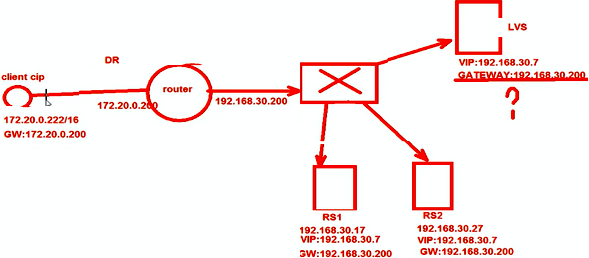
# Client: 172.20.0.222/16      GW: 172.20.0.200  
# Route: 172.20.0.200 192.168.30.200
# LVS: eth0:VIP:192.168.30.7 GW: 192.168.30.200
# RS: eth0:192.168.30.17/24 eth0:192.168.30.27/24 VIP:192.168.30.7 GW: 192.168.30.200

4.5负载调度器配置

1
2
3
4
5
6
7
8
9
10
11
12
13
14
15
16
17
18
19
20
[root@xy ~]# service NetworkManager stop  
[root@xy ~]# chkconfig NetworkManager off
[root@xy ~]# vim /etc/sysconfig/network-scripts/
[root@xy ~]# vim /etc/sysctl.conf # 开启负载调度器路由转发
net.ipv4.ip_forward=1
[root@xy ~]# sysctl -p # 刷新内核参数
[root@xy ~]# vim /etc/sysctl.conf # 关闭网卡重定向
net.ipv4.conf.all.send_redirects = 0
net.ipv4.conf.default.send_redirects = 0
net.ipv4.conf.eth0.send_redirects = 0
[root@xy ~]# sysctl -p
[root@xy ~]# modprobe ip_vs # 重新加载 ipvs 模块
[root@xy ~]# rpm -ivh ipvsadm # 安装ipvsadm工具
[root@xy ~]# ipvsadm -v # 查看当前集群内容
[root@xy ~]# ipvsadm -A -t 192.168.30.7:80 -s rr # 添加TCP集群
[root@xy ~]# ipvsadm -a -t 192.168.30.7:80:80 -r 192.168.30.17:80 -g # 添加ipvsadm集群子节点
[root@xy ~]# ipvsadm -a -t 192.168.30.7:80:80 -r 192.168.30.27:80 -g # -g DR模式
[root@xy ~]# ipvsadm -Ln
[root@xy ~]# service ipvsadm save
[root@xy ~]# chkconfig ipvsadm on

4.6真实服务器

1
2
3
4
5
6
7
8
9
10
11
12
13
14
15
16
17
18
19
[root@xy ~]# service NetworkManager stop  
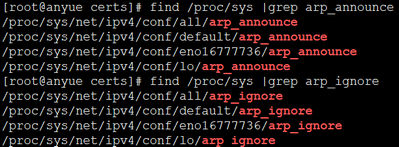
[root@xy ~]# vim /etc/sysctl.conf # 关闭对应ARP 响应及公告功能
net.ipv4.conf.all.arp_ignore = 1
net.ipv4.conf.all.arp_announce = 2
net.ipv4.conf.default.arp_ignore = 1
net.ipv4.conf.default.arp_announce = 2
net.ipv4.conf.lo.arp_ignore = 1
net.ipv4.conf.lo.arp_announce = 2
[root@xy ~]# sysctl -p
[root@xy ~]# cd /etc/sysconfig/network-scripts/
[root@xy ~]# cp ifcfg-lo ifcfg-lo:0
[root@xy ~]# vim ifcfg-lo:0 # 拷贝回环网卡子接口
DEVICE=lo:0
IPADDR=192.168.30.7 # VIP
NETMASK=255.255.255.255
[root@xy ~]# ifup lo:0
[root@xy ~]# route add -host 192.168.30.200 dev lo:0 # 添加路由记录,网关,当访问 VIP 交给lo:0 网卡接收
[root@xy ~]# echo "route add -host 192.168.30.200 dev lo:0" >> /etc/rc.local # 加入到开机自启中
[root@xy ~]# service httpd start

5.高可用集群(HAC)

5.1Keeplived原理:

  • 热备方式:VRRP 虚拟路由冗余协议
    • 一主+多备,共用同一个IP,但优先级不同
    • 支持故障自动切换
    • 支持节点健康状态检查

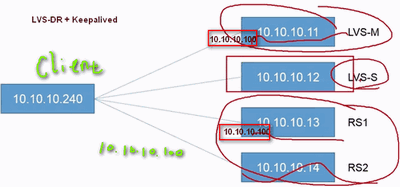
5.2LVS-DR+Keeplived:

5.3负载调度器 1

1
2
3
4
5
6
7
8
9
10
11
12
13
14
15
16
17
18
19
20
21
22
23
24
25
26
27
28
29
30
31
32
33
34
35
36
37
38
39
40
41
42
43
44
45
46
47
48
49
50
51
52
53
54
55
56
57
58
59
60
61
62
63
64
65
66
67
68
69
70
71
72
73
74
75
[root@xy ~]# service NetworkManager stop  
[root@xy ~]# chkconfig NetworkManager off
[root@xy ~]# cd /etc/sysconfig/network-scripts/
[root@xy ~]# cp -a ifcfg-eth0 ifcfg-eth0:0
[root@xy ~]# vim !$
DEVICE=eth0:0
IPADDR=10.10.10.100 #虚拟IP
NETMASK=255.255.255.0
[root@xy ~]# ifup eth0:0
[root@xy ~]# yum install -y ipvsadm
[root@xy ~]# vim /etc/sysctl.conf # 关闭网卡的广播功能,防止冲突
net.ipv4.conf.all.send_redirects = 0
net.ipv4.conf.default.send_redirects = 0
net.ipv4.conf.eth0.send_redirects = 0
[root@xy ~]# sysctl -p
[root@xy ~]# ipvsadm -A -t 10.10.10.100:80 -s rr 添加集群
[root@xy ~]# ipvsadm -a -t 10.10.10.100:80 -r 10.10.10.13:80 -g # 添加集群子节点,-g DR模式
[root@xy ~]# ipvsadm -a -t 10.10.10.100:80 -r 10.10.10.114:80 -g
[root@xy ~]# service ipvsadm save
[root@xy ~]# ipvsadm -Ln
IP Virtual Server version 1.2.1 (siza=4096)
Port LocalAddress:Port Scheduler Flags
-> RemoteAddress:Port Forward Weight ActiveConn InActConn
TCP 10.10.10.100:80 rr
->10.10.10.13:80 Route 1 0 0
->10.10.10.14:80 Route 1 0 0
[root@xy ~]# mkdir /mnt/keepalived # 配置 keepalived 文件 10.10.10.11
[root@xy ~]# mount -o loop Keepalived.iso
[root@xy ~]# cp -a /mnt/leepalived/* .
[root@xy ~]# vim /etc/keepalived/keepalived.conf
global_defs {
router_id R1 #命名主机名
}

vrrp_instance VI--1 {
state MASTER # 设置服务类型主/从(MASTER/SLAVE)
interface eth0 # 指定那块网卡用来监听
virtual_router_id 66 # 设置组号, 如果是一组就是相同的ID号, 一个主里面只能有一个主服务器和多个从服务器
priority 80 # 服务器优先级, 主服务器优先级高
advert_int 1 # 心跳时间, 检测对方存活
authenticetion { # 存活验证密码
auth_type PASS
auth_pass 1111
}
virtual_ipaddress {
10.10.10.100 #设置集群地址
}
}

virtual_server 10.10.10.100 80 { # 设置集群地址以及端口号
delay_loop 2 # 健康检查间隔
lb_algo rr # 使用轮询调度算法
lb_kind DR # DR模式的群集
protocol TCP # 使用的协议
real_server 10.10.10.13 80 { # 管理的网站节点以及使用端口
weight 1 # 权重, 优先级在原文件基础上删除修改
TCP_CHECK { # 状态检查方式
connect_port 80 # 检查的目标端口
connect_timeout 3 # 连接超时(秒)
nb_get_retry 3 # 重试次数
delay_before_retry 4 # 重试间隔(秒)
}
}
real_server 10.10.10.14 80 { # 管理的第二个网站节点以及使用端口
weight 1 # 权重, 优先级在原文件基础上删除修改
TCP_CHECK { # 状态检查方式
connect_port 80 # 检查的目标端口
connect_timeout 3 # 连接超时(秒)
nb_get_retry 3 # 重试次数
delay_before_retry 4 # 重试间隔(秒)
}
}
}
[root@xy ~]# service keepalived start
[root@xy ~]# tail -f /var/log/message

5.4负载调度器 2

1
2
3
4
5
6
7
8
9
10
11
12
13
14
15
16
17
18
19
20
21
22
23
24
25
[root@xy network-scripts]# cp -a ifcfg-eth0 ifcfg-eth0:0   10.10.10.12  
DEVICE=eth0:0
IPADDR=10.10.10.100
NETMASK=255.255.255.0
[root@xy network-scripts]# vim ifup-eth # 256行左右,注释arp命令
[root@xy network-scripts]# ifup eth0:0
[root@xy network-scripts]# vim /etc/keepalived/keepalived.conf
# 修改1:state MASTER 修改至state SLAVE
# 修改2:priority 100 修改至priority 47 一般建议与主服务器差值为50
[root@xy network-scripts]# service NetworkManager stop # 启动虚拟借口,必须关闭此服务
[root@xy network-scripts]# vim /etc/sysctl.conf # 修改内核参数。防止相同网络地址广播冲突, 如果有多快网卡需要设置多行
net.ipv4.conf.eth0.send_redirects = 0
net.ipv4.conf.all.send_redirects = 0
net.ipv4.conf.default.send_redirects = 0
net.ipv4.conf.eth0.send_redirects = 0
[root@xy network-scripts]# sysctl -p # 刷新内核参数
[root@xy network-scripts]# modprobe ip_vs # 查看内核是否加载, 无法应则以加载
[root@xy network-scripts]# cat /proc/net/ip_vs # 参看版本, 确认知否正确加载
[root@xy network-scripts]# cd /mnt/cdrom/Packages/ # 进入光盘挂载目录
[root@xy network-scripts]# rpm -ivh ipvsadm-1.26l......... # 安装ipvsadm管理工具
[root@xy network-scripts]# ipvsadm -v
[root@xy network-scripts]# ipvsadm -A -t 10.10.10.100:80 -s rr
[root@xy network-scripts]# ipvsadm -Ln # 查看设置的ipvsadm如果没有子项, 那么手动添加
[root@xy network-scripts]# ipvsadm -a -t 10.10.10.100:80 -r 10.10.10.13:80 -g
[root@xy network-scripts]# ipvsadm -a -t 10.10.10.100:80 -r 10.10.10.14:80 -g

5.5真实服务器

1
2
3
4
5
6
7
8
9
10
11
12
13
14
15
16
17
18
19
20
21
22
23
24
25
26
27
28
[root@xy ~]# service httpd start  # 真实服务器开启Web服务    
[root@xy ~]# chkconfig httpd on
[root@xy ~]# echo "this is Server 1" >> /var/www/index.html # 10.10.10.13
[root@xy ~]# curl localhost
[root@xy ~]# cd /etc/sysconfig/network-scripts/
[root@xy ~]# cp ifcfg-lo ifcfg-lo:0
[root@xy ~]# vim ifcfg-lo:0 拷贝回环网卡子接口
DEVICE=lo:0
IPADDR=10.10.10.100
NETMASK=255.255.255.255
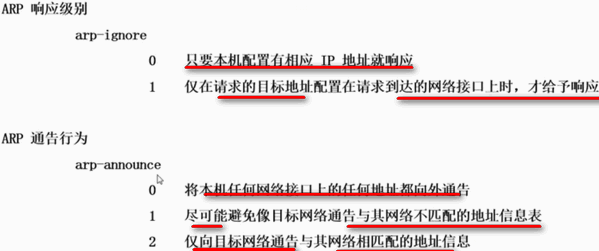
[root@xy ~]# vim /etc/sysctl.conf # 关闭对应ARP 响应及公告功能
net.ipv4.conf.all.arp_ignore = 1
net.ipv4.conf.all.arp_announce = 2
net.ipv4.conf.default.arp_ignore = 1
net.ipv4.conf.default.arp_announce = 2
net.ipv4.conf.lo.arp_ignore = 1
net.ipv4.conf.lo.arp_announce = 2
[root@xy ~]# sysctl -p
[root@xy ~]# ifup lo: 0
[root@xy ~]# route add -host 10.10.10.100 dev lo:0 # 添加路由记录,当访问VIP 交给lo:0 网卡接受
[root@xy ~]# echo "route add -host 10.10.10.100 dev lo:0" >> /etc/rc.local # 加入到开机自启中
[root@xy ~]# ipvsadm -Ln --stats
IP Virtual Server version 1.2.1 (siza=4096)
Port LocalAddress:Port
-> RemoteAddress:Port Conns InPkts OutPkts InBytes OutBytes
TCP 10.10.10.100:80 16 79 0 11036 0
->10.10.10.13:80 8 39 0 5481 0
->10.10.10.14:80 8 40 0 5555 0

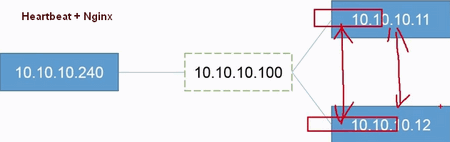
5.6Heartbeat+Nginx:

1
2
3
4
5
6
7
8
9
10
11
12
13
14
15
16
17
18
19
20
21
22
23
24
25
26
27
28
29
30
31
32
33
34
35
36
37
38
39
40
41
42
43
44
45
46
[root@xy ~]# yum -y install pcre pcre-devel zlib zlib-devel  # 10.10.10.11  
[root@xy nginx-1.2.6]# useradd -s /sbin/no-login -M nginx -M 家目录
[root@xy nginx-1.2.6]# ./configure --prefix=/usr/local/nginx --user=nginx --group=nginx
[root@xy nginx-1.2.6]# make && make install

[root@xy ~]# tar -xzvf heartbeat.tar.gz
[root@xy heartbeat]# yum -y install ntp # 安装时间同步服务程序
[root@xy heartbeat]# vim /ect/ntp.conf
restrict 10.10.10.0 mask 255.255.255.0 nomodify notrap
server 127.127.1.0
fudge 127.127.1.0 stratum 10
[root@xy heartbeat]# service ntpd start
[root@xy heartbeat]# chkconfig ntpd on
[root@xy ~] # yum install -y ntpdate # 10.10.10.12
[root@xy ~] # ntpdate -u 10.10.10.11
[root@xy heartbeat]# vim /etc/sysconfig/network # 更改主机名 uname -n
[root@xy heartbeat]# cd /usr/share/doc/heartbeat-3.0.4
[root@xy heartbeat]# cp -a authkeys ha.cf haresources /etc/ha.d
[root@xy heartbeat]# cd !$
[root@xy ha.d]# dd if=/dev/random bs=512 count=1 | openssl md5
记录了 0+1 的读入
记录了 0+1 的写入
16字节(16 B)已复制, 6.5455e-05 秒, 244 kb/秒
(stdin)=53a0ba829e8a55f7faea1891c850dde8
[root@xy ha.d]# vim authkeys
auth 3
1 crc
2 sha1 HI!
3 md5 53a0ba829e8a55f7faea1891c850dde8
[root@xy ha.d]# chmod 600 authkeys
[root@xy ha.d]# vim ha.cf # /bcast /node
bcast eth0 #Linux
node www.centos1.com
node www.centos2.com
[root@xy ha.d]# haresoures
www.centos1.com IPaddr::10.10.10.100/24/eth0:0 # 切换 IP 地址
[root@xy ~]# scp ha.cf authkeys haresoures root@10.10.10.12:/etc/ha.d/ # 10.10.10.12
[root@xy ha.d]# /etc/init.d/ha.d
#!/bin/bash # 检测脚本
PWD=/usr/local/script/
URL="http://10.10.10.11/index.html"
HTTP_CODE=`curl -o /dev/null -s -w "%{http_code}" "${URL}"`
if [ $HTTP_CODE != 200 ]
then
service heartbeat stop
fi

Linux 集群
https://anyu967.github.io/posts/f8c8020d.html
作者
anyu967
发布于
2019年6月12日
许可协议