2019-06-12-Zabbix
监控服务
1. 常见的监控平台
1.1 Cacti 流量与性能监测为主 Cacti
- 展示平台 Apache:B/S
- 收集数据:SNMP(Simple Network Management
Protocol)
- RRD Tool 绘图软件
1.2 Nagios 服务与性能检测为主
Nagios
- 展示平台:B/S
- 收集数据:C/S (脚本)
- ntop
1.3 Zabbix 新型全功能监控软件
Zabbix
- 展示平台:B/S
- 收集数据:C/S (脚本)、SNMP
2. Cacti 监控平台
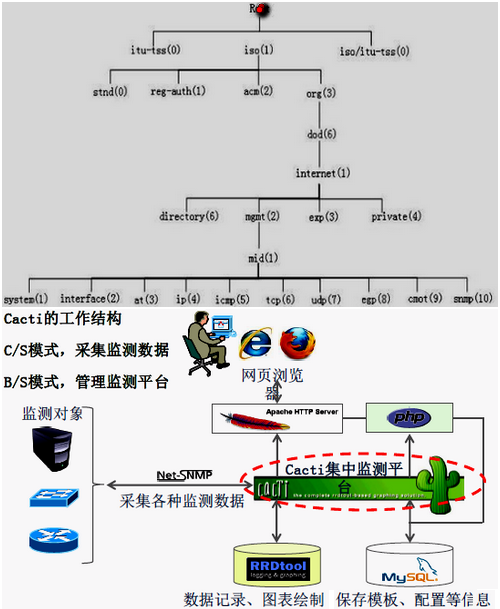
2.1 Cacti 原理
SNMP(收集数据) –>RRD Tool(绘图)
–>Apache(平台展示)
2.2 Cacti 监控构建
服务器端(10.10.10.11)
1
2
3
4
5
6
7
8
9
10
11
12
13
14
15
16
17
18
19
20
21
22
23
24
25
26
27
28
29
30
31
32
33
34
35
36
37
38
39
40
41
42
43
44
45
46
47
48
49
50
51
52
53
54
| [root@xy ~]# yum -y install httpd mysql \
mysql-server mysql-devel libxml2-devel \
mysql-connector-odbc perl-DBD-MySQL \
unixODBC php php-mysql php-pdo
[root@xy ~]# mysqladmin -uroot password anyu
[root@xy ~]# yum -y install \
net-snmp net-snmp-utils \
net-snmp-libs lm_sensors
[root@xy ~]# yum -y install libart_lgpl-devel \
pango-devel* cairo-devel*
[root@xy ~]# mount -o loop cacti.iso /mnt/iso
[root@xy ~]# cp -a /mnt/iso/* .
[root@xy ~]# tar -xzvf rrdtool-1.4.5.tar.gz
[root@xy rrdtool-1.4.5]# ./configure --prefix=/usr/local
[root@xy rrdtool-1.4.5]# make && make install
tar -xzvf cgilib-0.5.tar.gz
cd cgilib-0.5/
make
cp libcgi.a /usr/local/lib
cp cgi.h /usr/local/include
[root@xy cacti]# tar -xzvf cacti-0.8.7g.tar.gz
[root@xy cacti]# mv cacti-0.8.7g/ /var/www/html/
[root@xy www html]# ln -s cacti-0.8.7g/ cacti
[root@xy www cacti]# patch -p1 -N < /root/cacti/data_source_deactivate.patch
[root@xy www cacti]# useradd cacti
[root@xy www cacti]# chown -R root:root ./
[root@anyue html]# chmod -R 777 cacti/
[root@xy www cacti]# chown -R cacti:cacti rra/ log/
[root@xy www cacti]# mysql -uroot -p
mysql> create database cactidb default character set utf8;
mysql> grant all privileges on cactidb.* to cactiuser@localhost identified by 'cacti';
mysql> exit
[root@xy www cacti]# mysql -uroot -p cactidb < cacti.sql
[root@xy www cacti]# vim /include/config.php
29 $database_type = 'mysql';
30 $database_default = 'cactidb';
31 $database_hostname = 'localhost';
32 $database_username = 'cactiuser';
33 $database_password = 'cacti';
[root@xy www cacti]# vim /etc/httpd/conf/httpd.conf
DocumentRoot "/var/www/html/cacti"
<Directory "/var/www/html/cacti">
DirectoryIndex index.php index.html index.htm.var
|
2.3 Cacti 插件添加
10.10.10.12 (客户端)
1
2
3
4
5
6
7
8
9
10
11
12
13
14
15
16
17
18
19
20
21
22
| [root@xy ~]# yum -y install net-snmp net-snmp-utils net-snmp-libs lm_sensors
[root@xy ~]# vim /etc/snmpd.conf
com2sec notConfigUser default public123
view all include .1
access notConfigGroup "" any noauth exact all none none
[root@xy ~]# service snmpd start
[root@xy ~]# snmpwalk -v 2c -c public123 10.10.10.12 tcp
[runct@www html]# php /var/www/html/cacti/poller.php
[root@www html]# su -cacti
[runct@xy ~]# crontab -e
*/5 * * * * /usr/bin/php /var/www/html/cacti/poller.php &>/dev/null
[runct@xy ~]# service crond restart
[root@xy cacti-plugin]# tar -xzvf cacti-plugin-0.8.7-PA-v2.8.tar.gz
[root@xy cacti-plugin-arch]# mysql -uroot -p cactidb < pa.aql
[root@xy www cacti]# patch -p1 -N < /root/cacti-plugin/cacti-plugin-arch/cacti-plugin-0.8.7g-PA-v2.8.diff
|
2. Nagios 监控平台
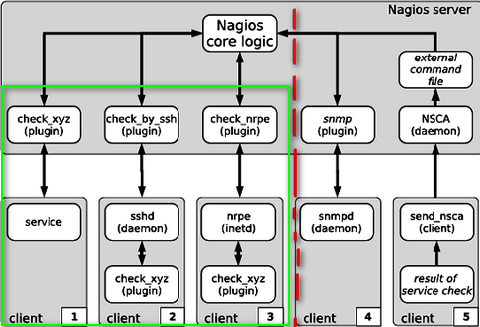
2.1 Nagios 原理
2.2 Nagios 构建
1
2
3
4
5
6
7
8
9
10
11
12
13
14
15
16
17
18
19
20
21
22
23
24
25
26
27
28
29
30
31
32
| [root@xy ~]# yum -y install httpd php php-cli php-mysql gcc glibc glibc-common gd gd-devel net-snmp openssl-devel wget unzip
[root@xy mnt cdrom]# yum -y insatall *gd*
[root@xy ~]# groupadd nagcmd
[root@xy ~]# useradd -m nagios
[root@xy ~]# usermod -a -G nagcmd nagios
[root@xy ~]# usermod -a -G nagcmd apache
[root@xy ~]# mount -o loop nagios.iso /mnt/iso
[root@xy ~]# cp -a /mnt/iso/* .
[root@xy ~]# tar -xzvf nagios-3.1.2.tar.gz
[root@xy nagios-3.1.2]# ./configure --with-command-group=nagcmd --enable-event-broker
[root@xy nagios-3.1.2]# make all
[root@xy nagios-3.1.2]# make install
[root@xy nagios-3.1.2]# make install-init
[root@xy nagios-3.1.2]# make install-config
directory for holding the external command file
[root@xy nagios-3.1.2]# make install-commandmode
[root@xy nagios-3.1.2]# vim /usr/local/nagios/etc/objects/contacts.cfg
email nagios@localhost
[root@xy nagios-3.1.2]# make install-webconf
[root@xy nagios-3.1.2]# vim /etc/httpd/conf.d/nagios.conf
[root@xy nagios-3.1.2]# htpasswd -c /usr/local/nagios/etc/htpasswd.users nagiosadmin
[root@xy ~]# tar -xzvf nagios-plugins-1.4.15.tar.gz
[root@xy nagios-plugins-1.4.15]# ./configure --with-nagios-user=nagios \
--with-nagios-group=nagios --with-mysql \
--enable-perl-modules
[root@xy nagios-plugins-1.4.15]# make all && make install
[root@xy nagios-plugins-1.4.15]# chkconfig --add nagios
[root@xy nagios-plugins-1.4.15]# chkconfig nagios on
[root@xy nagios-plugins-1.4.15]# /usr/local/nagios/bin/nagios -v /usr/local/nagios/etc/nagios.cfg
[root@xy nagios-plugins-1.4.15]# service nagios start
[root@xy nagios-3.1.2]# systemctl restart httpd
|
2.3 Nagios 添加监控主机
windows 监控插件(MSClient++.msi), windows端
1
2
3
4
5
6
7
8
9
10
| [root@anyue objects]# cd /usr/local/nagios/etc/objects
[root@anyue objects]# vim windows.cfg
[root@anyue objects]# cd /usr/local/nagios/etc
[root@anyue objects]# vim nagios.cfg
28
29 cfg_file=/usr/local/nagios/etc/objects/commands.cfg
30 cfg_file=/usr/local/nagios/etc/objects/contacts.cfg
31 cfg_file=/usr/local/nagios/etc/objects/timeperiods.cfg
32 cfg_file=/usr/local/nagios/etc/objects/templates.cfg
33 32 cfg_file=/usr/local/nagios/etc/objects/windows.cfg
|
linux 监控插件(nrpe), linux端
1
2
3
4
5
6
7
8
9
10
11
12
13
| [root@anyue ~]# useradd nagios
[root@xy ~]# tar -xzvf nagios-plugins-1.4.15.tar.gz
[root@xy nagios-plugins-1.4.15]# ./configure --with-nagios-user=nagios --with-nagios-group=nagios
[root@xy nagios-plugins-1.4.15]# make all && make install
[root@anyue nagios]# tar -xzf nrpe-3.2.1.tar.gz
[root@anyue nrpe-3.2.1]# ./configure --enable-ssl --with-ssl-lib=/usr/lib64/
[root@anyue nrpe-3.2.1]# make all
[root@anyue nrpe-3.2.1]# make install-plugin
[root@anyue nrpe-3.2.1]# make install-daemon
[root@anyue nrpe-3.2.1]# make install-daemon-config
[root@anyue nrpe-3.2.1]# cd /usr/local/nagios/etc/nrpe.cfg
allowed_hosts=serverIP 127.0.0.1
[root@anyue etc]# /usr/local/nagios/bin/nrpe -c /usr/local/nagios/etc/nrpe.cfg -d
|
3. Zabbix 监控构建
下载安装Zabbix
1
2
3
4
5
6
7
8
9
10
11
12
13
14
15
16
17
18
|
从你的 Windows 电脑中获取中文字体文件(路径通常为 C:\Windows\Fonts)。推荐选择 宋体(simsun.ttf)或 楷体(simkai.ttf)。将字体文件重命名为英文或拼音,例如:simhei.ttf
登录 Zabbix 服务器,找到网站的字体目录。
- 常见路径(源码安装):/usr/local/zabbix/php/assets/fonts/ 或 /data/wwwroot/zabbix/assets/fonts/
- 常见路径(RPM/包管理器安装):/usr/share/zabbix/assets/fonts/
- (老版本可能在 /usr/share/zabbix/fonts/ 或 /usr/share/zabbix/include/fonts/)
将准备好的字体文件上传到该目录下。修改 Zabbix 的字体配置文件以应用新字体:使用文本编辑器打开 /usr/share/zabbix/include/defines.inc.php(或对应的 Zabbix 前端配置文件)。
找到以下两行代码(旧版本或直接使用默认字体名称):
- define('ZBX_FONT_NAME', 'DejaVuSans');
- define('ZBX_GRAPH_FONT_NAME', 'DejaVuSans');
将 DejaVuSans 替换为上传的字体文件名(不包含 .ttf 或 .ttc 后缀),例如 simhei
|
3.1 初始化系统
1
2
3
4
| [root@xy ~]# systemctl stop firewalld
[root@xy ~]# systemctl disable firewalld
[root@xy ~]# setenforce 0
[root@xy ~]# sed -i "s/SELINUX=enforcing/SELINUX=disabled/g" /etc/selinux/config
|
3.2 构建 LAMP 环境
1
2
3
4
5
6
7
8
9
| [root@xy ~]# wget http://mirros.163.com/.help/CentOS7-Base-163.repo
[root@xy ~]# yum clean all
[root@xy ~]# yum makecache fast
[root@xy ~]# yum -y install mariadb mariadb-server httpd php php-mysql php-mbstring php-gd php-bcmatch php-ldap php=xml
[root@xy ~]# systemctl enable httpd
[root@xy ~]# systemctl restart httpd
[root@xy ~]# systemctl enable mariadb
[root@xy ~]# systemctl restart mariadb
[root@xy ~]# mysql_secure_installation
|
3.3 安装配置zabbix-server
1
2
3
4
5
6
7
8
9
10
11
12
13
14
15
16
| [root@xy ~]# rpm -ivh http://repo.zabbix.com/zabbix/3.2/rhel/7/x86_64/zabbix-release-3.2-1.el7.noarch.rpm
[root@xy ~]# rpm --import /etc/pki/rpm-gpg/RPM-GPG-KEY-ZABBIX
[root@xy ~]# yum -y install zabbix-server-mysql zabbix-web zabbix-web-mysql zabbix-agent
[root@xy ~]# mysql -uroot -p
MariaDB [(none)]> create database zabbix default character set utf8 collate utf8_bin;
MariaDB [(none)]> grant all privileges on zabbix.* to zabbix@localhost identified by 'zabbix';
[root@xy ~]# cd /usr/share/doc/zabbix-server-mysql-3.2.11/
[root@xy zabbix-server-mysql-3.2.11]# zcat create.sql.gz | mysql -uroot -p -Dzabbix
[root@xy zabbix-server-mysql-3.2.11]# vim /etc/zabbix/zabbix_server.conf ✔
LogFile=/tmp/zabbix_server.log
DBHost=localhost
DBName=zabbix
DBUser=zabbix
DBPassword=zabbix
[root@xy zabbix-server-mysql-3.2.11]# systemctl start zabbix-server
[root@xy zabbix-server-mysql-3.2.11]# systemctl enable zabbix-server
|
3.4 安装配置zabbix-web
1
2
3
4
5
6
7
8
9
10
11
12
13
14
15
16
17
| [root@xy zabbix-server-mysql-3.2.11]# vim /etc/httpd/conf.d/zabbix.conf
<virtualHost IP:80>
servername zabbix.anyu967.com
documentroot /usr/share/zabbix
...
php_value date.timezone Asia/Shanghai
</VirtualHost>
[root@xy ~]# systemctl restart httpd
[root@xy ~]# yum -y install ntpdate
[root@xy ~]# netstat -anpt | grep :10050
[root@xy ~]# vim /usr/share/zabbix/include/locales.inc.php
zh_CN => ['name' => _('Chinese (zh_CN)', 'display' => true)],
[root@xy ~]# mv simsun.ttc /usr/share/zabbix/fonts
[root@anyue zabbix]# cd !$
[root@xy fonts]# chomod a+x song.ttf
[root@xy fonts]# vim /usr/share/zabbix/include/defines.inc.php
define('ZBX_GRAPH_FONT_NAME', 'song');
|
3.5 Zabbix
添加监控主机 / 自动发现 10.10.10.12
1
2
3
4
5
6
7
8
9
10
11
12
13
14
15
16
17
18
19
20
21
22
| [root@xy ~]# yum install zabbix-sender zabbix-agent-3.2.11-1.el7.x86_64.rpm
[root@xy ~]# service httpd start
[root@xy ~]# echo "Hello,HTML~" >> /var/www/html/index.html
[root@xy ~]# curl localhost
[root@xy ~]# vim /etc/zabbix/zabbix_agentd.conf
PidFile=/var/run/zabbix/zabbix_agent.pid
LogFile=/tmp/zabbix_agentd.log
Server=10.10.10.11
ServerActive=10.10.10.11
Hostname=10.10.10.12
[root@xy ~]# service zabbix-agent start
[root@xy ~]# chkconfig zabbix-agent on
[root@xy ~]# netstat -anptl | grep :10050
[root@xy ~]# yum -y install zabbix-sender zabbix-agent-3.2.1-1.el6.x86_64.rpm
[root@xy ~]# vim /etc/zabbix/zabbix_agentd.conf
Server=10.10.10.11
ServerActive=10.10.10.11
Hostname=10.10.10.13
|
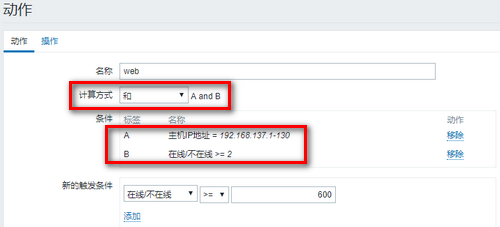
先创建动作–> 自动发现

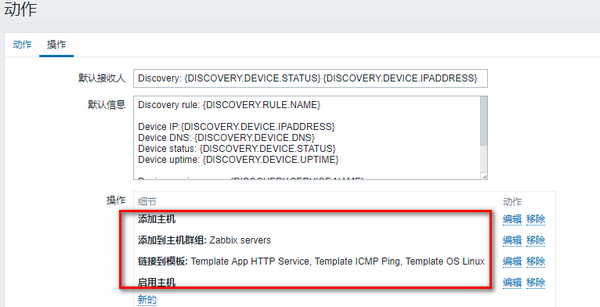
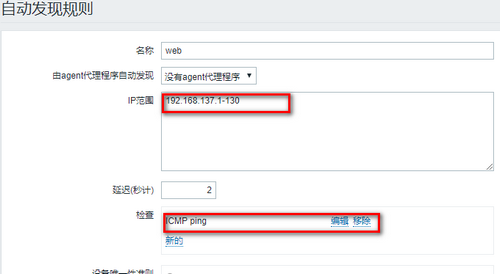
3.6 Zabbix
Nginx 并发监控(自定义脚本功能) 10.10.10.12
1
2
3
4
5
6
7
8
9
10
11
12
13
14
15
16
17
18
19
20
21
22
23
24
25
26
27
28
29
30
31
32
33
34
35
36
37
38
39
40
41
42
43
44
45
46
47
48
49
50
51
52
53
54
55
56
57
58
59
| [root@xy nginx-1.2.6]# yum -y install pcre pcre-devel zlib zlib-devel
[root@xy nginx-1.2.6]# ./configure --help | grep status
[root@xy nginx-1.2.6]# useradd -s /sbin/nologin -M nginx
[root@xy nginx-1.2.6]# ./configure --prefix=/usr/local/nginx --user=nginx --group=nginx --with-htttp_stub_status_module
[root@xy nginx-1.2.6]# make && make install
[root@xy nginx-1.2.6]# echo "123" >> /usr/local/nginx/html/index.html
[root@xy nginx-1.2.6]# /usr/local/nginx/sbin/nginx
[root@xy nginx-1.2.6]# vim /usr/local/nginx/conf/nginx.conf
location /nginx-status {
stub_status on;
}
[root@xy nginx-1.2.6]# /usr/local/nginx/sbin/nginx -t
[root@xy nginx-1.2.6]# kill -HUP $(cat /usr/local/nginx/logs/nginx.pid)
HOST="10.10.10.12"
PORT="80"
function ping {
/sbin/pidof nginx | wc -l
}
function active {
/usr/bin/curl "http://$HOST:$PORT/ngx_status" 2>/dev/null | grep 'Active' | awk '{print $NF}'
}
function reading {
/usr/bin/curl "http://$HOST:$PORT/ngx_status" 2>/dev/null | grep 'Reading' | awk '{print $2}'
}
function writing {
/usr/local/curl "http://$HOST:$PORT/ngx_status" 2>/dev/null | grep 'Writing' | awk '{print $4}'
}
function waiting {
/usr/local/curl "http://$HOST:$PORT/ngx_status" 2>/dev/null | grep 'waiting' | awk '{print $6}'
}
function accepts {
/usr/local/curl "http://$HOST:$PORT/ngx_status" 2>/dev/null | awk NR==3 | awk '{print $1}'
}
function handle {
/usr/local/curl "http://$HOST:$PORT/ngx_status" 2>/dev/null | awk NR==3 | awk '{print $2}'
}
function requests {
/usr/local/curl "http://$HOST:$PORT/ngx_status" 2>/dev/null | awk NR==3 | awk '{print $3}'
}
$1
%s/ngx_status/nginx_status/g
[root@xy nginx-1.2.6]# chmod a+x nginx-status.sh
[root@xy nginx-1.2.6]# mv nginx-status.sh /etc/zabbix/zabbix_agentd.d/
[root@xy ~]# vim /etc/zabbix/zabbix_agentd.conf ✔
UnsafeUserParameter=1
UserParameter=nginx.status[*],/etc/zabbix/zabbix_agentd.d/nginx-status.sh $1
[root@xy ~]# service zabbix-agent restart
[root@xy ~]# yum -y install zabbix-get
[root@xy ~]# zabbix_get -s 10.10.10.12 -k 'nginx.status[requests]'
|
Zabbix-templete下载
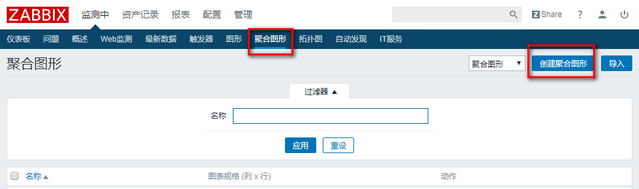
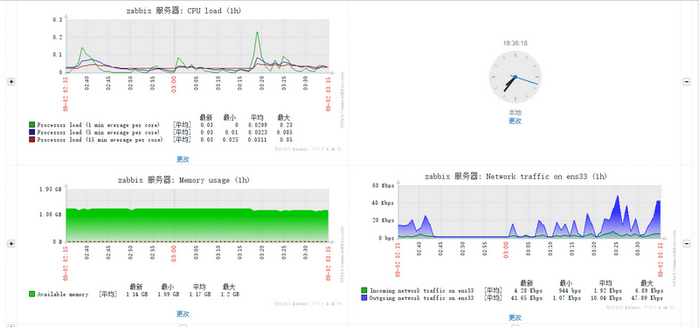
3.7 Zabbix Web场景、组合图
监控主机–> 创建应用集–> 创建web场景–>
创建触发器
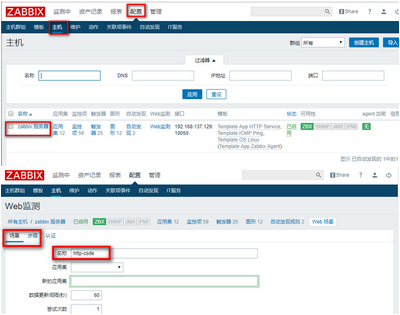
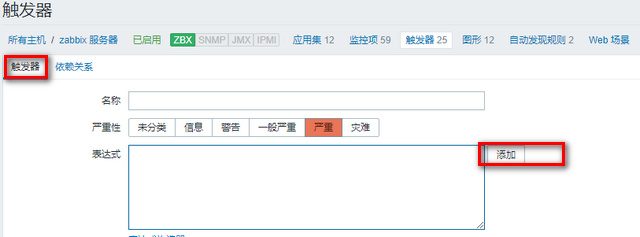
创建聚合图形–> 编辑聚合图形–> 添加组件
3.8 Zabbix
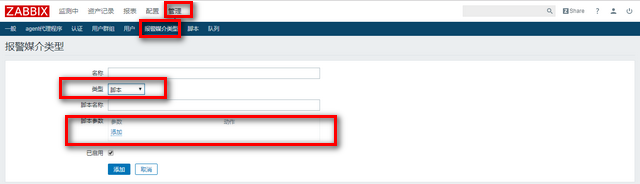
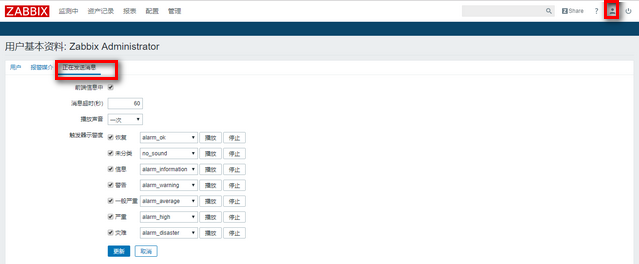
报警设置(管理–> 报警媒介类型–> 创建媒体类型)
3.8.1
邮件报警功能(脚本指定路径查看: /etc/zabbix/zabbix_server.conf)
1
2
3
4
5
6
7
8
9
10
11
12
13
| #!/bin/bash
to=$1
subject=$2
context=$3
echo -e "$context" |mail -s "$subject" "$to"
vim /etc/mail.rc
set from=发件邮箱
set smtp=smtp服务器
set smtp-auth-user=发件人邮箱账户
set smtp-auth-password=发件人邮箱账户密码
set smtp-auth=login
|
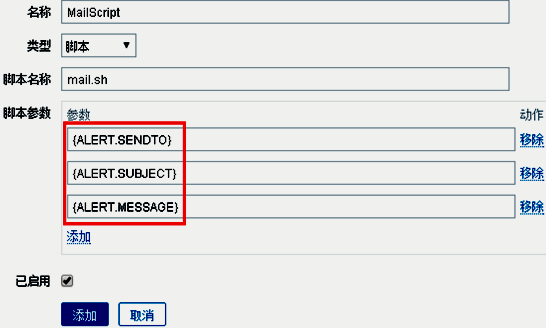
注意: 若某个zabbix
用户也想使用邮箱媒介报警,则需要在管理--> 用户--> 报警媒介中添加
3.9 创建动作(触发器)