Linux服务配置01

2019-06-11-Linux服务配置01

目录

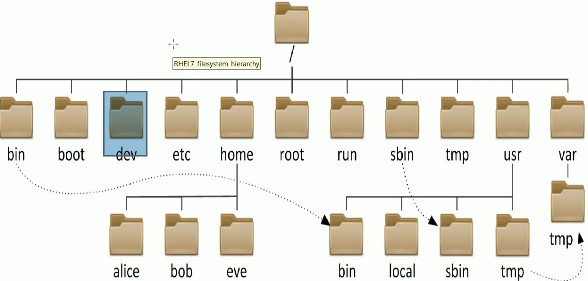
1. 一切从 / 开始

类别 说明
/boot 开机所需文件——内核、开机菜单以及所需配置文件
/dev 以文件形式存放任何设备及接口
/etc 配置文件
/home 用户家目录
/bin 存放单用户模式下还可以操作的命令
/lib 开机时用到的函数库
/sbin 开机过程中用到的命令
/media 挂载设备文件的目录
/opt 第三方软件
/root 系统管理员家目录
/srv 网络服务的数据文件目录
/tmp 任何人均可使用的“共享”临时目录
/proc 虚拟文件系统
/usr/local 用户自行安装的软件
/usr/sbin 开机不会使用的软件及脚本
/usr/share 帮助与说明文件
/var 经常变化文件,日志
/lost+found 当文件系统发生错误,存放丢失的文件片段

2. 路径

绝对路径:从根目录(/)开始写起的文件或目录
相对路径:相对于当前路径的写法 ./ ../ ~

3. 物理设备的命名规则

类别 说明
IDE /dev/hd[a-d]
SCSI/SATA/U盘 /dev/sd[a-p]
软驱 /dev/fd[0-1]
打印机 /dev/lp[0-15]
光驱 /dev/cdrom
鼠标 /dev/mouse
磁带机 /dev/st0 /dev/ht0
  • 主分区/扩展分区编号从1开始,到4结束 逻辑分区从编号5开始
    硬盘设备是由大量扇区组成的,每个扇区的容量为512字节,第一个扇区最重要,保存了主引导记录与分区表信息MBR,主引导记录用446B,分区表用64B,结束符用2B;分区表记录一个分区信息需要16B,最多只有4个分区信息可以写到第一个扇区中,这四个分区就是4个主分区;
  • 为了解决分区个数不够,可以将第一个扇区分区表中16B(原本写入主分区信息)的空间(称为扩展分区)拿出来指向另外一个分区表。扩展分区不是一个真正的分区,是一个占用16字节分区表空间的指针。所以,用户一般会选择3个主分区加1个扩展分区,在扩展分区中建立数个逻辑分区

4. 文件系统与数据资料

选项 说明
EXT3 日志文件系统
Ext4 Ext3改进版,RHEL6系统默认文件管理系统,支持存储容量高达1EB
XFS 高性能的日志文件系统,RHEL7默认文件管理系统,最大支持存储容量18EB

5. 挂载硬件设备

注: mount -a 会自动检查/etc/fstab文件有无疏漏的挂载设备,若有则自动进行挂载

选项 说明
-t 指定文件的系统类型:iso9600
-o 描述设备或档案的挂载方式
loop:把文件当成硬盘分区挂载
ro:只读方式
rw:读写方式
1
2
3
4
5
6
7
8
9
10
11
12
13
14
[root@xy ~]# mount /dev/sdb2 /backup # 挂载目录需要挂载前创建好,mount[设备文件 挂在目录]  
[root@xy ~]# vim /etc/fstab # 开机自动挂载sdb2
1 #
2 # /etc/fstab
3 # Created by anaconda on Fri Jul 6 08:44:38 2018
4 #
5 # Accessible filesystems, by reference, are maintained under '/dev/disk'
6 # See man pages fstab(5), findfs(8), mount(8) and/or blkid(8) for more info
7 #
8 /dev/mapper/rhel-root / xfs defaults 1 1
9 UUID=28d7b2f5-a322-4990-ab6c-5936d156fce7 /boot xfs defaults 1 2
10 /dev/mapper /rhel-swap swap swap defaults 0 0
11 /dev/cdrom /media/cdrom iso9660 defaults 0 0
12 /dev/sdb2 /backup ext4 defaults 0 0

6. 撤销挂载设备

1
[root@xy ~]# umount /dev/sdb2 # umount [设备文件/挂在目录]

7. 分区-格式化-挂载:

fdisk

选项 说明
-m 查看全部可用参数
-n 添加新的分区,p主分区,e扩展分区
-d 删除某个分区信息
-q 不保存退出
-l ✔列出所以可用的分区类型
-t ✔改变某个分区的信息
-p ✔查看分区信息
-w 保存并退出

7.1 分区:

1
2
3
4
5
6
7
8
9
10
11
12
13
14
15
16
17
18
19
20
21
22
23
24
25
26
27
28
29
30
31
32
33
34
35
36
37
38
39
40
41
42
43
44
45
46
47
48
49
50
51
[root@xy ~]# fdisk /dev/sdb  # sd -->SATA
Welcome to fdisk (util-linux 2.23.2).

Changes will remain in memory only, until you decide to write them.
Be careful before using the write command.

Device does not contain a recognized partition table
Building a new DOS disklabel with disk identifier 0x301a431a.

Command (m for help): p #查看分区信息
Disk /dev/sdb: 21.5 GB, 21474836480 bytes, 41943040 sectors
Units = sectors of 1 * 512 = 512 bytes
Sector size (logical/physical): 512 bytes / 512 bytes
I/O size (minimum/optimal): 512 bytes / 512 bytes
Disk label type: dos
Disk identifier: 0x301a431a

Device Boot Start End Blocks Id System

Command (m for help): n #添加新的分区
Partition type:
p primary (0 primary, 0 extended, 4 free)
e extended

Select (default p): p
Partition number (1-4, default 1): 1
First sector (2048-41943039, default 2048):
Using default value 2048
Last sector, +sectors or +size{K,M,G} (2048-41943039, default 41943039): +2G # 创建2GB分区
Partition 1 of type Linux and of size 2 GiB is set

Command (m for help): p  # 查看分区信息
Disk /dev/sdb: 21.5 GB, 21474836480 bytes, 41943040 sectors
Units = sectors of 1 * 512 = 512 bytes
Sector size (logical/physical): 512 bytes / 512 bytes
I/O size (minimum/optimal): 512 bytes / 512 bytes
Disk label type: dos
Disk identifier: 0x301a431a

Device Boot Start End Blocks Id System
/dev/sdb1 2048 4196351 2097152 83 Linux

Command (m for help): w # 保存分区信息并退出
The partition table has been altered!
Calling ioctl() to re-read partition table.
Syncing disks.

[root@xy ~]# file /dev/sdb # file 查看 /dev/sdb1 文件属性 /dev/sdb1: cannot open (No such file or directory)
[root@xy ~]# partprobe #partprobe 同步分区信息到系统内核
[root@xy ~]# file /dev/sdb1
/dev/sdb1: block special

7.2 格式化(创建文件系统类型): mkfs.文件类型名称 /dev/sdb1

1
2
3
4
5
6
7
8
9
10
11
12
13
14
[root@xy ~]# mkfs # 分区完后用 mkfs 格式化  
mkfs mkfs.cramfs mkfs.ext3 mkfs.fat mkfs.msdos
mkfs.xfs mkfs.btrfs mkfs.ext2 mkfs.ext4 mkfs.minix
mkfs.vfat
[root@xy ~]# mkfs -t xfs /dev/sdb1
meta-data=/dev/sdb1 isize=256 agcount=4, agsize=131072 blks
= sectsz=512 attr=2, projid32bit=1
= crc=0
data =bsize=4096 blocks=524288, imaxpct=25
= sunit=0 swidth=0 blks
naming =version 2 bsize=4096 ascii-ci=0 ftype=0
log =internal log bsize=4096 blocks=2560, version=2
= sectsz=512 sunit=0 blks, lazy-count=1
realtime =none extsz=4096 blocks=0, rtextents=0

7.3 挂载分区:

1
2
3
4
5
6
7
8
9
10
11
12
13
14
15
16
17
18
19
20
21
[root@xy ~]# mkdir /newFS
[root@xy ~]# mount /dev/sdb1 /newFS/
[root@xy ~]# df -h   # 查看挂载状态及设备 建议 df -Th 命令信息更全
Filesystem Size Used Avail Use% Mounted on
/dev/mapper/rhel-root 28G 3.0G 25G 11% /
devtmpfs 985M 0 985M 0% /dev
tmpfs 994M 148K 994M 1% /dev/shm
tmpfs 994M 8.8M 986M 1% /run
tmpfs 994M 0 994M 0% /sys/fs/cgroup
/dev/sr0 3.5G 3.5G 0 100% /media/cdrom
/dev/sda1 497M 119M 379M 24% /boot
/dev/sdb1 2.0G 33M 2.0G 2% /newFS

[root@xy ~]# cp -rf /etc/* /newFS
[root@xy ~]# ls /newFS
abrt hosts pulse
adjtime host.allow purple
........省略部分信息........

[root@xy ~]# du -sh /newFS/   # du -sh 查看空间占用情况
33M /newFS/

8. 添加交换分区swap

交换分区是把内存中暂时不用的数据临时存放到硬盘中,解决物理内存不足问题,交换分区一般为物理内存的1.5~2倍 ,mkswap 与 swapon

8.1 分区:

1
2
3
4
5
6
7
8
9
10
11
12
13
14
15
16
17
18
19
20
21
22
23
24
25
26
27
28
29
30
31
32
33
34
35
36
37
38
39
[root@xy ~]# fdisk /dev/sdb   # 分区  
Welcome to fdisk (util-linux 2.23.2).

Changes will remain in memory only, until you decide to write them.
Be careful before using the write command.

Command (m for help): n
Partition type:
p primary (1 primary, 0 extended, 3 free)
e extended

Select (default p): p
Partition number (2-4, default 2): 2
First sector (4196352-41943039, default 4196352):
Using default value 4196352
Last sector, +sectors or +size{K,M,G} (4196352-41943039, default 41943039): +5G
Partition 2 of type Linux and of size 5 GiB is set

Command (m for help): p
Disk /dev/sdb: 21.5 GB, 21474836480 bytes, 41943040 sectors
Units = sectors of 1 * 512 = 512 bytes
Sector size (logical/physical): 512 bytes / 512 bytes
I/O size (minimum/optimal): 512 bytes / 512 bytes
Disk label type: dos
Disk identifier: 0x301a431a

Device Boot Start End Blocks Id System
/dev/sdb1 2048 4196351 2097152 83 Linux
/dev/sdb2 4196352 14682111 5242880 83 Linux

Command (m for help): w
The partition table has been altered!

Calling ioctl() to re-read partition table.

WARNING: Re-reading the partition table failed with error 16: Device or resource busy.
The kernel still uses the old table. The new table will be used at
the next reboot or after you run partprobe(8) or kpartx(8)
Syncing disks.

8.2 格式化:

1
2
3
4
5
6
7
8
9
10
11
12
[root@xy ~]# mkswap /dev/sdb2   # 格式化 mkswap  
/dev/sdb2: No such file or directory
[root@xy ~]# partprobe
[root@xy ~]# partprobe
[root@xy ~]# mkswap /dev/sdb2
Setting up swapspace version 1, size = 5242876 KiB
no label, UUID=ffe8494a-c2f5-4af4-becf-985b130d395c
[root@xy ~]# free -m
total used free shared buffers cached
Mem: 1987 1137 850 9 1 279
-/+ buffers/cache: 856 1131
Swap: 0 0 0

8.3 挂载分区:

1
2
3
4
5
6
7
8
9
10
11
12
13
14
15
16
17
18
19
20
21
[root@xy ~]# swapon /dev/sdb2     # 挂载使用  
[root@xy ~]# free -m
total used free shared buffers cached
Mem: 1987 1141 846 9 1 279
-/+ buffers/cache: 860 1127
Swap: 5119 0 5119

[root@xy ~]# vim /etc/fstab  # 设置自动挂载
1 #
2 # /etc/fstab
3 # Created by anaconda on Fri Jul 6 08:44:38 2018
4 #
5 # Accessible filesystems, by reference, are maintained under '/dev/disk'
6 # See man pages fstab(5), findfs(8), mount(8) and/or blkid(8) for more info
7 #
/dev/mapper/rhel-root / xfs defaults 1 1
UUID=28d7b2f5-a322-4990-ab6c-5936d156fce7 /boot xfs defaults 1 2
/dev/mapper /rhel-swap swap swap defaults 0 0
/dev/cdrom /media/cdrom iso9660 defaults 0 0
/dev/sdb1 /newFS xfs defaults 0 0
/dev/sdb2 swap swap defaults 0 0

9. 删除手动增加的交换分区swap

1
2
3
4
5
6
[root@xy ~]# /sbin/swapoff /dev/sdb2  
[root@xy ~]# vim /etc/fstab
/dev/sdb2 swap swap defaults 0 0  # 删除
[root@xy ~]# swapon -s
Filename Type Size Used Priority
/dev/dm-0 partition 2113532 0 -1

10. 磁盘容量配额技术

配置/etc/fstab,使/boot目录支持uquota,磁盘容量配额技术

1
UUID=28d7b2f5-a322-4990-ab6c-5936d156fce7 /boot    xfs    defaults,uquota 1 2
1
2
3
4
5
6
7
8
9
10
11
12
13
14
15
16
17
18
19
20
21
22
23
24
25
26
27
28
29
30
31
32
33
34
35
36
37
38
39
40
[root@xy ~]# reboot  
[root@xy ~]# mount | grep boot
/dev/sda1 on /boot type xfs (rw,relatime,seclablel,attr2,inode64,usrquota)
[root@xy ~]# useradd tom
[root@xy ~]# chmod -Rf o+w /boot  # other write
[root@xy ~]# xfs_quota -x -c 'limit bsoft=3m bhard=6m isoft=3 ihard=6 tom' /boot
[root@xy ~]# xfs_quota -x -c report /boot # xfs_quota -x -c
User quota on /boot (/dev/sda1) Blocks
User ID Used Soft Hard Warn/Grace
----------- ----------------------------------------------
root 95084 0 0 00 [--------]
tom 0 3072 6144 00 [--------]

[root@xy ~]# su - tom
[tom@xy ~]$ dd if=/dev/zero of=/boot/tom bs=5M count=1
1+0 records in
1+0 records out
5242880 bytes (5.2 MB) copied, 0.123996 s, 42.3 MB/s

[tom@xy ~]$ dd if=/dev/zero of=/boot/tom bs=8M count=1
dd: error writing '/boot/tom': Disk quato exceeded   # 限制
1+0 records in
1+0 records out
6291456 bytes (6.3 MB) copied, 0.0201596s, 312MB/s

[root@xy ~]# edquota -u tom  # edquota -u 按需修改配额
Disk quotas for user tom (uid 1001):
Filesystem blocks soft hard inodes soft hard
/dev/sda 6114 3072 8192 1 3 6

[root@xy ~]# su - tom
[tom@xy ~]$ dd if=/dev/zero of=/boot/tom bs=8M count=1
1+0 records in
1+0 records out
8388608 bytes (8.4 MB) copied, 0.0238044s, 313MB/s
[tom@xy ~]$ dd if=/dev/zero of=/boot/tom bs=10M count=1
dd: error writing '/boot/tom': Disk quato exceeded
1+0 records in
1+0 records out
8388608 bytes (8.4 MB) copied, 0.0238044s, 313MB/s

11. 创建链接文件ln

:link:cnblog参考

1
[root@xy /]# ln -s ../usr/share/zoneinfo/Asia/Shanghai /etc/localtime #相对目录建立, 找相对于链接的根目录

硬链接与软链接的区别:

ln src dst
1、不能跨分区;
2、删除源文件不影响链接文件;
3、inode号不变,指向同一个文件;
4、链接数增加;
##软链接:
ln -s src dst
1、可以跨分区;
2、删除源文件影响链接文件;
3、inode号不相同;
4、链接数不变;
ln -s ../boot/grub2/grub.cfg /etc/grub2.cfg

12. RAID与LVM磁盘阵列技术

  • RAID(fd)(Redundant Array of Independent Disks,独立冗余磁盘阵列)
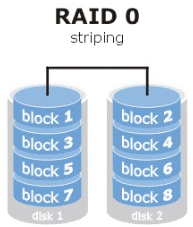
  • RAID 0(Srtiping):把多块物理硬件设备(至少2块)通过硬件或软件凡事串联在一起,组成一个大的卷组,提升了硬盘数据的吞吐量,但不具备数据备份和错误修复能力;
    • 性能提升:读写;
    • 冗余(容错)能力:无;
    • 空间利用率:ns(s–> 一块盘利用率)
    • 至少2块
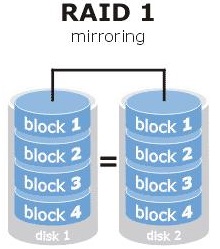
  • RAID 1(Mirroring):数据写到多块硬盘设备上,当某一块硬盘发生故障后,一般会立即以热交换方式来恢复数据的正常使用,但硬盘的使用率却下降了,只有33%左右 ✔
    • 性能提升:写下降,读提升;
    • 冗余能力:有;
    • 空间利用率:1/2
    • 至少2块
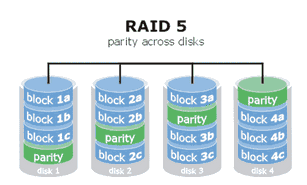
  • RAID 5:将硬盘设备的数据奇偶校验信息保存到除自身外每一块硬盘设备上,当硬盘出现问题,通过奇偶校验信息来尝试重建损坏的数据 ✔
    • 性能提升:读写提升;
    • 冗余能力:有;
    • 空间利用率:(n-1)s/n
    • 至少3块
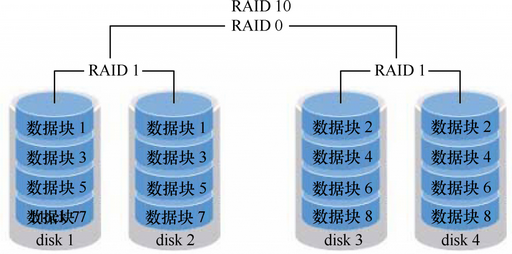
  • RAID 10:RAID10=RAID 1 + RAID 0
    • 性能提升:读写提升;
    • 冗余能力:有;
    • 空间利用率:1/2
    • 至少4块
  • mdadm 命令
选项 说明
-C 创建 ✔
-v 显示过程 ✔
-a 检测设备名称
-n 指定设备数量 ✔
-l 指定RAID级别
-D 查看详细信息 ✔
-f 模拟设备损坏
-Q 查看摘要信息
-r 移除设备
-S 停止RAID磁盘阵列
-x 备用盘

12.1 部署磁盘阵列RAID 5(也可以拿分区做实验)

1)创建RAID 5:

1
2
3
4
5
6
[root@xy ~]# mdadm -Cv -a yes /dev/md0 -n 3 -l 5 -x 1 /dev/sd{c,d,e,f}
mdadm: layout defaults to left-symmetric
mdadm: chunk size defaults to 512K
mdadm: Defaulting to version 1.2 metadata
mdadm: array /dev/md0 started.

2)查看RAID 5:

1
2
3
4
5
6
7
8
9
10
11
12
13
14
15
16
17
18
19
20
21
22
23
24
25
26
27
[root@xy ~]# mdadm -D /dev/md0  
[root@xy ~]# watch -n 'command' # 周期性执行指定命令,并以全屏方式显示结果
/dev/md0:
Version : 1.2
Creation Time : Fri May 8 09:20:35 2018
Raid Level : raid5
Array Size : 41909248 (39.97 GiB 42.92 GB)
Used Dev Size : 20954624 (19.98 GiB 21.46 GB)
Raid Devices : 3
Total Devices : 4
Persistence : Superblock is Persistence
Update Time : Fri May 8 09:22:22 2018
State : clean
Active Devices : 3
Working Devices : 4
Failed Devices : 0
Spare Devices : 1
Layout : left-symmetric
Chunk Size : 512K
Name : xy.com:0 (local to host xy.com)
UUID : 111c244f:e080b0c1:3316b6f2:986fa663
Events : 18
Number Major Minor RaidDevice State
0 8 16 0 active sync /dev/sdc
1 8 32 1 active sync /dev/sdd
4 8 48 2 active sync /dev/sde
3 8 64 - spare /dev/sdf

3)格式化RAID 5:

1
2
3
4
5
6
7
8
9
10
11
12
13
14
15
16
17
18
19
20
21
22
[root@xy ~]# mkfs.ext4 /dev/md0
mke2fs 1.42.9 (28-Dec-2013)
Filesystem label=
OS type: Linux
Block size=4096 (log=2)
Fragment size=4096 (log=2)
Stride=128 blocks, Stripe width=256 blocks
2621440 inodes, 10477312 blocks
523865 blocks (5.00%) reserved for the super user
First data block=0
Maximum filesystem blocks=2157969408
320 block groups
32768 blocks per group, 32768 fragments per group
8192 inodes per group
Superblock backups stored on blocks:
32768, 98304, 163840, 229376, 294912, 819200, 884736, 1605632, 2654208,
4096000, 7962624

Allocating group tables: done
Writing inode tables: done
Creating journal (32768 blocks): done
Writing superblocks and filesystem accounting information: done

4)挂载 RAID 5

1
2
3
4
5
6
7
8
9
10
11
12
13
14
15
16
17
18
19
20
21
22
23
24
25
26
27
28
29
30
31
32
[root@xy ~]# echo "/dev/md0 /RAID ext4 defaults 0 0" >> /etc/fstab  
[root@xy ~]# mkdir /RAID
[root@xy ~]# mount -a
[root@xy ~]# mdadm /dev/md0 -f /dev/sdc
mdadm: set /dev/sdc faulty in /dev/md0
[root@xy ~]# mdadm -D /dev/md0
/dev/md0:
Version : 1.2
Creation Time : Fri May 8 09:20:35 2018
Raid Level : raid5
Array Size : 41909248 (39.97 GiB 42.92 GB)
Used Dev Size : 20954624 (19.98 GiB 21.46 GB)
Raid Devices : 3
Total Devices : 4
Persistence : Superblock is Persistence
Update Time : Fri May 8 09:23:51 2018
State : active, degraded, resering
Active Devices : 2
Working Devices :3
Failed Devices : 1
Spare Devices : 1
Layout : left-symmetric
Chunk Size : 512K
Rebuild Status : 0% complete
Name : xy.com:0 (local to host xy.com)
UUID : 111c244f:e080b0c1:3316b6f2:986fa663
Events : 21
Number Major Minor RaidDevice Status
3 8 64 0 spare rebuilding /dev/sdf
1 8 32 1 active sync /dev/sdd
4 8 48 2 active sync /dev/sde
0 8 16 - faulty /dev/sdc

12.3 部署磁盘阵列RAID 10:

1) 创建 RAID 10:
1
2
3
4
5
6
7
[root@xy ~]# mdadm -Cv /dev/md0 -a yes -n 4 -l 10 /dev/sd{c,d,e,f}     
mdadm: layout defaults to n2
mdadm: chunk size defaults to 512K
mdadm: size set to 20954624K
mdadm: Defaulting to version 1.2 metadata
mdadm: array /dev/md0 started.
2) 格式化 RAID 10:
1
2
3
4
5
6
7
8
9
10
11
12
13
14
15
16
17
18
19
20
21
22
[root@xy ~]# mkfs.ext4 /dev/md0 # 格式化 ext4  
mke2fs 1.42.9 (28-Dec-2013)
Filesystem label=
OS type: Linux
Block size=4096 (log=2)
Fragment size=4096 (log=2)
Stride=128 blocks, Stripe width=256 blocks
2621440 inodes, 10477312 blocks
523865 blocks (5.00%) reserved for the super user
First data block=0
Maximum filesystem blocks=2157969408
320 block groups
32768 blocks per group, 32768 fragments per group
8192 inodes per group
Superblock backups stored on blocks:
32768, 98304, 163840, 229376, 294912, 819200, 884736, 1605632, 2654208,
4096000, 7962624

Allocating group tables: done
Writing inode tables: done
Creating journal (32768 blocks): done
Writing superblocks and filesystem accounting information: done
3) 挂载 RAID 10:
1
2
3
4
5
6
7
8
9
10
11
12
13
[root@xy ~]# mkdir /RAID  # 挂载 /dev/md0
[root@xy ~]# mount /dev/md0 /RAID/
[root@xy ~]# df -h
Filesystem Size Used Avail Use% Mounted on
/dev/mapper/rhel-root 28G 3.0G 25G 11% /
devtmpfs 985M 0 985M 0% /dev
tmpfs 994M 148K 994M 1% /dev/shm
tmpfs 994M 8.8M 986M 1% /run
tmpfs 994M 0 994M 0% /sys/fs/cgroup
/dev/sdb1 2.0G 33M 2.0G 2% /newFS
/dev/sr0 3.5G 3.5G 0 100% /media/cdrom
/dev/sda1 497M 119M 379M 24% /boot
/dev/md0 40G 49M 38G 1% /RAID
4) 查看 RAID 10 信息:
1
2
3
4
5
6
7
8
9
10
11
12
13
14
15
16
17
18
19
20
21
22
23
24
25
26
27
28
29
30
31
32
[root@xy ~]# mdadm -D /dev/md0  # 查看 /dev/md0 磁盘阵列详细信息
/dev/md0:
Version : 1.2
Creation Time : Mon Jul 9 20:07:08 2018
Raid Level : raid10
Array Size : 41909248 (39.97 GiB 42.92 GB)
Used Dev Size : 20954624 (19.98 GiB 21.46 GB)
Raid Devices : 4
Total Devices : 4
Persistence : Superblock is persistent

Update Time : Mon Jul 9 20:10:35 2018
State : active, resyncing
Active Devices : 4
Working Devices : 4
Failed Devices : 0
Spare Devices : 0

Layout : near=2
Chunk Size : 512K

Resync Status : 96% complete

Name : xy.com:0 (local to host xy.com)
UUID : 111c244f:e080b0c1:3316b6f2:986fa663
Events : 16

Number Major Minor RaidDevice State
0 8 32 0 active sync /dev/sdc
1 8 48 1 active sync /dev/sdd
2 8 64 2 active sync /dev/sde
3 8 80 3 active sync /dev/sdf

12.2 模拟损坏磁盘阵列及修复:

1
2
3
4
5
6
7
8
9
10
11
12
13
14
15
16
17
18
19
20
21
22
23
24
25
26
27
28
29
30
31
32
33
34
[root@xy ~]# mdadm /dev/md0 -f /dev/sdc # -f 模拟设备损坏 
mdadm: set /dev/sdc faulty in /dev/md0
[root@xy ~]# mdadm -D /dev/md0
/dev/md0:
Version : 1.2
Creation Time : Mon Jul 9 20:07:08 2018
Raid Level : raid10
Array Size : 41909248 (39.97 GiB 42.92 GB)
Used Dev Size : 20954624 (19.98 GiB 21.46 GB)
Raid Devices : 4
Total Devices : 4
Persistence : Superblock is persistent

Update Time : Mon Jul 9 20:23:34 2018
State : clean, degraded
Active Devices : 3
Working Devices : 3
Failed Devices : 1
Spare Devices : 0

Layout : near=2
Chunk Size : 512K

Name : xy.com:0 (local to host xy.com)
UUID : 111c244f:e080b0c1:3316b6f2:986fa663
Events : 21

Number Major Minor RaidDevice State
0 0 0 0 removed
1 8 48 1 active sync /dev/sdd
2 8 64 2 active sync /dev/sde
3 8 80 3 active sync /dev/sdf

0 8 32 - faulty /dev/sdc
1
2
3
4
5
6
7
8
9
10
11
12
13
14
15
16
17
18
19
20
21
22
23
24
25
26
27
28
29
30
31
32
33
34
35
36
37
[root@xy ~]# reboot  
[root@xy ~]# umount /dev/RAID
[root@xy ~]# mdadm /dev/md0 -a /dev/sdc
mdadm: added /dev/sdc
[root@xy ~]# mdadm -D /dev/md0

/dev/md0:
Version : 1.2
Creation Time : Mon Jul 9 20:07:08 2018
Raid Level : raid10
Array Size : 41909248 (39.97 GiB 42.92 GB)
Used Dev Size : 20954624 (19.98 GiB 21.46 GB)
Raid Devices : 4
Total Devices : 4
Persistence : Superblock is persistent

Update Time : Mon Jul 9 21:04:28 2018
State : clean, degraded, recovering
Active Devices : 3
Working Devices : 4
Failed Devices : 0
Spare Devices : 1

Layout : near=2
Chunk Size : 512K

Rebuild Status : 19% complete

Name : xy.com:0 (local to host xy.com)
UUID : 111c244f:e080b0c1:3316b6f2:986fa663
Events : 32

Number Major Minor RaidDevice State
4 8 32 0 spare rebuilding /dev/sdc
1 8 48 1 active sync /dev/sdd
2 8 64 2 active sync /dev/sde
3 8 80 3 active sync /dev/sdf

13. LVM(8e) (Logical Volume Manager,逻辑卷管理器)

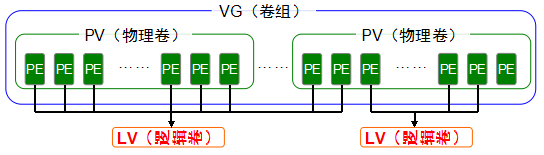
在硬盘分区和文件系统之间添加了一个逻辑层,提供了一个抽象的卷组,可以把多块硬盘进行卷合并实现对硬盘分区的动态调整

  • 物理卷(PV) 就是真正的物理硬盘或者分区
  • 卷组(VG) 将多个物理卷合起来组成卷组,组成同一个卷组的物理卷可以是同一个硬盘的不同分区,也可以是不同硬盘的不同分区,抽象为一个逻辑硬盘
  • 逻辑卷(LV) 卷组是一个逻辑硬盘,硬盘分区后才可以使用,类似的,从卷组出来的分区为逻辑卷,可以抽象为分区

13.1 常用LVM部署命令

项目 PV VG LV
扫描 pvscan vgscan lvscan
建立 pvcreate vgcreate lvcreate
显示 pvs/pvdisplay vgs/vgdisplay lvs/lvdisplay
移除 pvremove vgremove lvremove
扩展 vgextend vgextend lvextend
缩小 vgreduce vgreduce lvreduce

13.2 创建LVM: PV -> VG -> LV -> mkfs.ext4 /dev/storage/vo -> monut

1) pvcrate 创建物理卷:
1
2
3
[root@xy ~]# pvcreate /dev/sd{c,d}
Physical volume "/dev/sdc" successfully created
Physical volume "/dev/sdd" successfully created
2) vgcrate 创建卷组管理:
1
2
[root@xy ~]# vgcreate storage /dev/sd{c,d}  # 添加到storage卷组中 
Volume group "storage" successfully created
3) vgdisplay 显示卷组管理:
1
2
3
4
5
6
7
8
9
10
11
12
13
14
15
16
17
18
19
20
21
[root@xy ~]# vgdisplay storage
--- Volume group ---
VG Name storage
System ID
Format lvm2
Metadata Areas 2
Metadata Sequence No 1
VG Access read/write
VG Status resizable
MAX LV 0
Cur LV 0
Open LV 0
Max PV 0
Cur PV 2
Act PV 2
VG Size 39.99 GiB
PE Size 4.00 MiB # -s 8M 指定PE大小
Total PE 10238
Alloc PE / Size 0 / 0
Free PE / Size 10238 / 39.99 GiB
VG UUID pjR9cJ-VoyM-TZsz-NdMb-s05a-0VQZ-wHhEBo
4) lvcrate 创建逻辑卷:
1
2
3
4
[root@xy ~]# lvcreate -l 37 -n vo storage # 从卷组里边 创建逻辑卷 lvcreate  
Logical volume "vo" created
-L 以容量为单位(-L 15G)
-l 以PE(4MB)为单位
5) lvdisplay 显示逻辑卷:
1
2
3
4
5
6
7
8
9
10
11
12
13
14
15
16
17
[root@xy ~]# lvdisplay 
--- Logical volume ---
LV Path /dev/storage/vo
LV Name vo
VG Name storage
LV UUID bDRxSW-f9X3-KkjE-UPJL-wsrj-2zXm-pCNpcq
LV Write Access read/write
LV Creation host, time xy.com, 2018-07-10 10:03:43 +0800
LV Status available
open 0
LV Size 148.00 MiB
Current LE 37
Segments 1
Allocation inherit
Read ahead sectors auto
currently set to 8192
Block device 253:2
6) 格式化逻辑卷:
1
2
[root@xy ~]# mkfs.ext4 /dev/storage/vo
[root@xy ~]# mke2fs -j /dev/storage/vo
7) 挂载使用逻辑卷:
1
2
3
4
[root@xy ~]# mkdir /LVM 
[root@xy ~]# mount /dev/storage/vo /LVM/
[root@xy ~]# vim /etc/fstab
/dev/storage/vo /LVM ext4 defaults 0 0
8) 扩容

外加磁盘

1
2
3
4
5
6
7
[root@xy ~]# fdisk t 8e
[root@xy ~]# mkfs.ext4 /dev/sdb1 # 不用分区也可以
---
[root@xy ~]# pvcreate /dev/sdb1
[root@xy ~]# vgextend VolGroup /dev/sdb1
[root@xy ~]# lvextend -L +20G /dev/volGroup/VolGroup-lv_root
[root@xy ~]# resize2fs /dev/volGroup/VolGroup-lv_root

把其它分区分给空间不足的

1
2
3
4
5
6
7
8
9
10
11
12
[root@xy ~]# umount /home   # 25G
[root@xy ~]# e2fsck -f /dev/volGroup/VolGroup-lv_home
[root@xy ~]# resize2fs -p /dev/volGroup/VolGroup-lv_home 10G # xfs格式用xfs_growfs
---
[root@xy ~]# mount /home
[root@xy ~]# lvreduce -L -15G /dev/volGroup/VolGroup-lv_home
[root@xy ~]# lvextend -L +15G 或 lvextend -l +100%FREE /dev/volGroup/VolGroup-lv_root
[root@xy ~]# resize2fs -p /dev/volGroup/VolGroup-lv_root

[root@xy ~]# fuser -m -v /home
[root@xy ~]# kill -9 PID
# 建议保留Free PE/SIZE 一点空间,不要全用上;

14. 逻辑卷快照:类似于虚拟机快照, 特点:快照卷容量必须等同于逻辑卷容量; 快照卷是一次性的, 执行后会立即自动删除

1
2
3
4
5
6
7
8
9
10
11
12
13
14
15
16
17
18
19
20
21
22
23
24
25
26
27
28
29
30
31
32
33
34
35
36
37
38
39
40
41
42
43
44
45
46
47
48
49
50
51
52
53
54
55
56
57
58
59
60
[root@xy ~]# vgdisplay
--- Volume group ---
VG Name storage
System ID
Format lvm2
...
Total PE 10238
Alloc PE / Size 37 / 148.00 MiB # PE 创建快照大小依据
Free PE / Size 10201 / 39.85 GiB
VG UUID 6YZPns-qgdy-yEFx-hEZ3-bLwe-2eDd-PFEip8

[root@xy ~]# echo "Welcome to linux" > /LVM/readme.txt
[root@xy ~]# lvcreate -L 148M -n SNAP -p r -s /dev/storage/vo  # -s创建快照卷
Logical volume "SNAP" created

[root@xy ~]# lvdisplay

--- Logical volume ---
LV Path /dev/storage/vo
LV Name vo
VG Name storage
...
LV snapshot status source of SNAP [active]
LV Status available
open 1
LV Size 148.00 MiB
...
currently set to 8192
Block device 253:2

--- Logical volume ---
LV Path /dev/storage/SNAP
LV Name SNAP
VG Name storage
LV UUID dERsif-hvjx-20JJ-1BLn-dPxb-aYtw-n1zetn
LV Write Access read/write
LV Creation host, time xy.com, 2018-07-10 14:00:46 +0800
LV snapshot status active destination for vo
LV Status available
open 0
LV Size 148.00 MiB
...
Block device 253:3

[root@xy ~]# dd if=/dev/zero of=/LVM/files count=1 bs=100M
[root@xy ~]# mount -o /dev/storage/SNAP /mnt/SNAP # ext4
[root@xy ~]# mount -o nouuid,ro /dev/storage/SNAP /mnt/SNAP # xfs

[root@xy ~]# umount /LVM
[root@xy ~]# umount /mnt/SANP
[root@xy ~]# lvconvert --merge /dev/storage/SNAP  # 快照还原
Merging of volume SNAP started.
vo: Merged: 33.5%
vo: Merged: 100.0%
Merge of snapshot into logical volume vo has finished.
Logical volume "SNAP" successfully removed

[root@xy ~]# mount /dev/storage/vo /LVM/
[root@xy ~]# ls /LVM/
lost+found readme.txt

15. 删除逻辑卷: LV -> VG -> PV

1
2
3
4
5
6
7
8
9
10
[root@xy ~]# umount /LVM/
[root@xy ~]# lvremove /dev/storage/vo # lvremove
Do you really want to remove active logical volume vo? [y/n]: y
Logical volume "vo" successfully
removed
[root@xy ~]# vgremove storage
Volume group "storage" successfully removed
[root@xy ~]# pvremove /dev/sdc /dev/sdd
Labels on physical volume "/dev/sdc" successfully wiped
Labels on physical volume "/dev/sdd" successfully wiped

16. iptables 与 firewalld 防火墙(四表五链)

16.1 iptables命令 参数 + 策略规则链 + 动作 :

1
2
3
4
iptables  [-t 表名]  选项 [链名]  [条件]  [-j 控制类型]
1)默认filter表;
2)默认表内所有链;
3)选项、链名、控制类型使用大写字母,其余均为小写;
选项 说明
-P 设置默认策略 ✔
-F 清空规则链 ✔
-L 查看规则链 ✔
-A 在规则链的 末尾 添加新规则 ✔
-I num 在规则链的 头部 添加新规则 ✔
-D num 删除某一条规则 ✔ iptables -t 表明 -D 链名 num
-s IP/MASK 匹配来源地址IP/MASK,加!表示除这个IP外
-d IP/MASK 匹配目标地址(多个IP用逗号隔开)
-i 网卡名称 匹配从这块网卡流入的数据(PREROUTING、INPUT、FORWARD)
-o 网卡名称 匹配从这块网卡流出的数据(FORWARD、OUTPUT、POSTROUTING)
-p Protocol 匹配协议,如:TCP/UDP/ICMP
–dport num 匹配目标端口号
–sport num 匹配来源端口号
-v 数据报文 字节数显示(信息更全) iptables --line-number -vnL INPUT
-n 以数字形式显示IP地址、端口
--line-numbers 查看规则,显示序号 ✔
-N -E -X 自定义、重命名、删除自定义链
-m,–module 扩展模块
-m multiport –sport 用于匹配报文源端口,多个端口用逗号隔开
-m multiport –dport 用于匹配报文目的端口,多个端口用逗号隔开
-m iprange –src-range IP范围
-m iprange –dst-range IP范围
-m mac –macl-source MAC地址
-m tcp –sport 用于匹配tcp协议报文源端口,用冒号定义连续端口
-m tcp –dport 用于匹配tcp协议报文目的端口,用冒号定义连续端口
-m state –state 连接状态
NEW,ESTABLISHED,RELATED -j ACCEPT

16.2 策略规则链[iptables]服务把用于处理或过滤流量的策略条目称为规则,多条规则可组成一个规则链,而规则链则依据数据包处理位置的不同进行分类,具体如下:

  • 报文路径:
    • 到本机某进程的报文(PREROUTING --> INPUT);
    • 由本机转发的报文(PREROUTING --> FORWARD--> POSTROUTING);
    • 由本机的某进程发出报文,即响应报文(OUTPUT --> POSTROUTING);
四表(相同功能规则的集合) 说明
raw表 关闭nat启用的连接追踪机制
mangle表 拆解报文,做出修改,重新封装功能
nat表 网络地址转换功能,内核模块
filter表 过滤功能,防火墙,内核模块

五链(钩子) 说明
PREROUTING链 在进行路由选择前处理数据包(raw>mangle>nat)
INPUT链 处理流入数据包
OUTPUT链 处理流出数据包
FORWARD链 处理转发数据包
POSTROUTING链 在进行路由选择后处理数据包

-L 查看规则链

1
2
3
4
5
6
7
8
9
[root@xy ~]# iptables -L  # -L 查看规则链 Look  
Chain INPUT (policy ACCEPT)
target prot opt source destination
ACCEPT all -- anywhere anywhere ctstate RELATED,ESTABLISHED
ACCEPT all -- anywhere anywhere
INPUT_direct all -- anywhere anywhere
........省略部分输出信息........
[root@xy ~]# iptables-save > /home/User/iptables.bak # 备份
[root@xy ~]# iptables-restore < /home/User/iptables.bak # 还原

-F 清空规则链

1
2
3
4
5
6
7
8
9
10
11
12
[root@xy ~]# iptables -F  
[root@xy ~]# iptables -L
Chain INPUT (policy ACCEPT)
target prot opt source destination

Chain FORWARD (policy ACCEPT)
target prot opt source destination

Chain OUTPUT (policy ACCEPT)
target prot opt source destination

........省略部分输出信息........

iptables -P参数默认策略 INPUT规则链 DROP动作

1
2
3
4
[root@xy ~]# iptables -P INPUT DROP
[root@xy ~]# iptables -L
Chain INPUT (policy DROP)
........省略部分输出信息........

iptables -I头部添加新规则 INPUT规则链 -p icmp ACCEPT动作

1
[root@xy ~]# iptables -I INPUT -p icmp -j ACCEPT

iptables -D删除某一条规则 INPUT规则链 序号

1
[root@xy ~]# iptables -D INPUT 1

iptables -P默认策略 INPUT规则链 ACCEPT动作

1
2
3
4
[root@xy ~]# iptables -P INPUT ACCEPT
[root@xy ~]# iptables -L
Chain INPUT (policy ACCEPT)
........省略部分输出信息........

16.4 仅允许指定网段的主机访问本机的22端口 SSH

1
2
3
4
5
6
7
8
9
10
11
12
13
14
15
16
17
#iptables -I头部添加新规则 INPUT规则链 源IP -p tcp --dport 22 ACCEPT动作  
[root@xy ~]# iptables -I INPUT -s 192.168.37.0/24 -p tcp --dport 22 -j ACCEPT  

#iptables -A尾部添加新规则 INPUT规则链 -p tcp --dport 22 REJECT动作
[root@xy ~]# iptables -A INPUT -p tcp --dport 22 -j REJECT
[root@xy ~]# iptables -L
Chain INPUT (policy ACCEPT)
target prot opt source destination
ACCEPT tcp -- 192.168.37.0/24 anywhere tcp dpt:ssh
REJECT tcp -- anywhere anywhere tcp dpt:ssh
reject-with icmp-port-unreachable
........省略部分输出信息........

[root@clientA ~]# ssh 192.168.37.10 # 网段192.168.37.0/24 是可以的
[root@clientA ~]# ssh 192.168.37.10 # 网段192.168.20.0/24 XXXXXXXX
Connecting to 192.168.37.10:22...
Could not connect to '192.168.37.10'(port 22): Connection failed

16.5 INPUT 规则链加入拒绝所有人访问本机12345端口的策略规则

1
2
3
4
5
6
7
8
9
10
11
12
13
[root@xy ~]# iptables -I INPUT -p tcp --dport 12345 -j REJECT   
[root@xy ~]# iptables -I INPUT -p udp --dport 12345 -j REJECT
[root@xy ~]# iptables -L
Chain INPUT (policy ACCEPT)
target prot opt source destination
REJECT udp -- anywhere anywhere udp dpt:italk
reject-with icmp-port-unreachable
REJECT tcp -- anywhere anywhere tcp dpt:italk
reject-with icmp-port-unreachable
ACCEPT tcp -- 192.168.37.0/24 anywhere tcp dpt:ssh
REJECT tcp -- anywhere anywhere tcp dpt:ssh
reject-with icmp-port-unreachable
........省略部分输出信息........

16.6 INPUT 规则链加入拒绝所有人访问本机1000:1024端口的策略规则

1
2
3
4
5
6
7
8
9
10
11
12
[root@xy ~]# iptables -A INPUT -p tcp --dport 1000:1024 -j REJECT
[root@xy ~]# iptables -A INPUT -p udp --dport 1000:1024 -j REJECT
[root@xy ~]# iptables -L
Chain INPUT (policy ACCEPT)
target prot opt source destination
REJECT udp -- anywhere anywhere udp dpt:italk
reject-with icmp-port-unreachable
REJECT tcp -- anywhere anywhere tcp dpt:italk
reject-with icmp-port-unreachable
ACCEPT tcp -- 192.168.37.0/24 anywhere tcp dpt:ssh
REJECT tcp -- anywhere anywhere tcp dpt:ssh
........省略部分输出信息........

16.7 INPUT 规则链加入拒绝192.168.37.5访问本机80端口的策略规则

1
2
3
4
5
6
7
8
9
[root@xy ~]# iptables -I INPUT -p tcp -s 192.168.37.5 --dport 80 -j REJECT
[root@xy ~]# iptables -L
Chain INPUT (policy ACCEPT)
target prot opt source destination
REJECT tcp -- 192.168.37.5 anywhere tcp dpt:http
reject-with icmp-port-unreachable
........省略部分输出信息........
[root@xy ~]# service iptables save  # 永久生效
iptables: Saving firewall rules to /etc/sysconfig/iptables:[ OK ]

16.8 禁止源自192.168.10.0/24 网段的流量访问本机sshd服务:

1
2
[root@xy ~]# iptables -I INPUT -s 192.168.10.0/24 -p tcp --dport 22 -j REJECT  
[root@xt ~]# service iptables save

16.9 SNAT && DNAT

1
2
3
4
5
6
7
8
9
10
[root@xy ~]# modprobe ip_tables  
[root@xy ~]# modprobe
[root@xy ~]# vim /etc/sysctl.conf # /proc/sys/net/ipv4/ip_forward
[root@xy ~]# net.ipv4.ip_forward = 1
[root@xy ~]# sysctl -p /etc/sysctl.conf
[root@xy ~]# iptables -F

#网关服务器: eth0(192.168.1.1) eth1(218.29.30.31)
#局域网客户机(服务器): 192.168.1.6
#公网服务器(客户机): 58.63.236.45

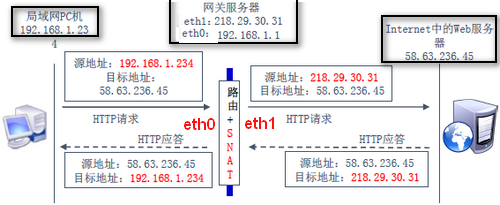
16.10 SNAT 转换规则:内网访问外网(路由后交给SNAT)

1
2
3
4
5
[root@xy ~]# iptables -t nat -A  POSTROUTING -s 192.168.1.0/24 -o eth1 -j SNAT --to-source 218.29.30.31     
[root@xy ~]# iptables -t nat -A POSTROUTING -s 192.168.1.0/24 -o eth1 -j MASQUERADE
[root@xy ~]# service iptables save
[root@xy ~]# vim /etc/sysconfig/iptables
[root@xy~]# tcpdump -i eth0 -nn -X icmp

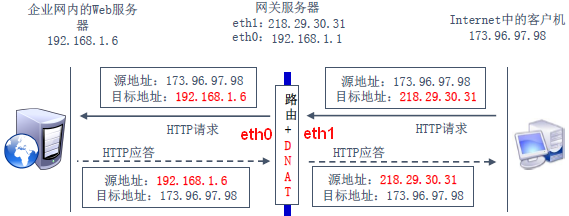
16.11 DNAT 转换规则:外网访问内网(路由前交给DNAT)

1
2
3
4
[root@xy ~]# iptables -t nat -A  PREROUTING -d 218.29.30.31 -i eth1 -p tcp --dport 8080 -j DNAT --to-destination 192.168.1.6:80      
[root@xy ~]# service iptables save
[root@xy ~]# iptables-save > 1.iptables
[root@xy ~]# iptables-restore < 1.iptables

16.12 解决Windows访问Samba服务拒绝的方法:

1
2
3
4
[root@xy ~]# iptables -L --line-number -n    # 以带有序号形式查看规则

[root@xy ~]# iptables -t filter -I INPUT 7 -p udp -m multiport --dport 139,445 -j ACCEPT
[root@xy ~]# iptables -t filter -I INPUT 7 -p tcp -m multiport --dport 139,445 -m state --state NEW -j ACCEPT

17 firewalld(Dynamic Firewall Manager of Linux system):Linux动态防火墙管理器

管理方式:CLI(命令行界面) 与 GUI(图形用户界面)

17.1 firewalld中常用的区域名及策略规则:

区域 默认规则策略
trusted 允许所有数据包
home 拒绝流入的流量,除非与流出的流量相关;而如果流量与ssh、mdns、ipp-client、amba-client与dhcpv6-client服务相关,则允许流量
internal 等同于home区域
public 拒绝流入的流量,除非与流出的流量相关;而如果流量与ssh、dhcpv6-client服务相关,则允许流量
external 拒绝流入的流量,除非与流出的流量相关;而如果流量与ssh服务相关,则允许流量
dmz 拒绝流入的流量,除非与流出的流量相关;而如果流量与ssh服务相关,则允许流量
block 拒绝流入的流量,除非与流出的流量相关
drop 拒绝流入的流量,除非与流出的流量相

17.2 firewall-cmd 命令:

选项 说明
--get-default-zone 查询默认区域名称
--set-default-zone=<区域名称> 设置默认区域,使其永久生效
--get-zones 显示可用区域
--get-services 显示预先定义服务
--get-active-zones 显示当前正使用的区域与网卡名称
--add-source= 将源自此IP/子网流量导向某个指定区域
--remove-source= 不再将源自此IP/子网流量导向某个指定区域
--add-interface=<网卡名称> 将源自此网卡所有流量导向某个指定区域
--change-interface=<网卡名称> 将某个网卡与区域进行关联
--list-all 显示当前区域网卡配置参数/资源/端口/服务
--list-all-zones 显示所有区域网卡配置参数/资源/端口/服务
--add-service=<服务名> 设置默认区域允许该服务的流量
--add-port=<端口号/协议> 设置默认区域允许该端口的流量
--remove-service=<服务名> 设置默认区域不再允许该服务的流量
--remove-port=<端口号/协议> 设置默认区域不再允许该端口的流量
--reload 让永久生效的配置规则立即生效,覆盖当前配置规则
--panic-on 开启应急状况模式
--panic-off 关闭应急状况模式
1
2
3
4
5
6
7
8
9
10
11
12
13
14
[root@xy ~]# firewall-cmd --get-default-zone  
public
[root@xy ~]# firewall-cmd --get-zone-of-interface=eno16777736
public
[root@xy ~]# firewall-cmd --permanent --zone=external --change-interface=eno16777736
success # 重启后生效
[root@xy ~]# firewall-cmd --get-zone-of-interface=eno16777736
external
[root@xy ~]# firewall-cmd --set-default-zone=public # firewall当前服务设置为public
success
[root@xy ~]# firewall-cmd --panic-on # 启动/关闭防火墙应急状况模式,阻断一切网络连接
success
[root@xy ~]# firewall-cmd --panic-off
success

查询public区域是否允许请求SSH和HTTPS协议流量

1
2
3
4
[root@xy ~]# firewall-cmd --zone=public --query-service=ssh
yes
[root@xy ~]# firewall-cmd --zone=public --query-service=https
no

firewalld服务中请求HTTPS协议流量设置永久允许,立即生效

1
2
3
4
5
6
[root@xy ~]# firewall-cmd --zone=public --add-service=https
success
[root@xy ~]# firewall-cmd --permanent --zone=public --add-service=https
success
[root@xy ~]# firewall-cmd --reload # 更改设置立即生效
success

firewalld服务中请求HTTP协议流量设置永久拒绝,立即生效

1
2
3
4
[root@xy ~]# firewall-cmd --permanent --zone=public --remove-service=http # permanent
success
[root@xy ~]# firewall-cmd --reload
success

firewalld 服务中访问8080 8081端口流量策略设置允许,仅当前生效

1
2
3
[root@xy ~]# firewall-cmd --zone=public --add-port=8080-8081/tcp
success
[root@xy ~]# firewall-cmd --zone=public --list-ports 8080-8081/tcp

流量转发 访问本机888端口的流量转发到22端口

1
2
3
[root@xy ~]# firewall-cmd --permanent --zone=public     --add-forward-port=port=888:proto=tcp:toport=22:toaddr=192.168.37.10
[root@xy ~]# firewall-cmd --reload
success

服务的ACL

1
2
[root@xy ~]# vim /etc/hosts.deny
[root@xy ~]# vim /etc/host.allow

18. 使用SSH服务管理远程主机

1
2
3
4
5
6
7
8
9
10
[root@xy ~]# nmtui  # GUI配置网络参数
[root@xy ~]# cd /etc/sysconfig/network-scripts/
[root@xy network-scripts]# vim ifcfg-eno16777736
[root@xy network-scripts]# systemctl restart network
[root@xy network-scripts]# ping -c 4 192.168.37.10
PING 192.168.37.10 (192.168.37.10) 56(84) bytes of data.
64 bytes from 192.168.37.10: icmp_seq=1 ttl=64 time=31.3 ms
--- 192.168.37.10 ping statistics ---
4 packets transmitted, 4 received, 0% packet loss, time 3005ms
rtt min/avg/max/mdev = 0.183/8.006/31.325/13.463 ms
1
2
3
4
5
6
7
8
9
10
11
12
13
14
15
16
17
18
19
20
21
[root@xy network-scripts]# nmcli connection show  # 管理Network Manager服务
NAME UUID TYPE DEVICE
eno16777736 e1fa8452-091b-429e-adce-ecea92a845c7 802-3-ethernet eno16777736
[root@xy network-scripts]# nmcli con show eno16777736
connection.id: eno16777736
connection.uuid: e1fa8452-091b-429e-adce-ecea92a845c7
connection.interface-name:
........省略部分输出信息........
[root@xy ~]# nmcli connection add con-name company ifname eno16777736
autoconnect
no type ethernet ip4 192.168.37.10/24 gw4 192.168.37.1
Connection 'company' (a8b3a029-5c7b-4ec7-b519-69f6862e616f) successfully added.
[root@xy ~]# nmcli connection add con-name house type ethernet ifname eno16777736
Connection 'house' (00a825ae-b1c2-4130-a1f6-c693de73783c) successfully added.
[root@xy ~]# nmcli connection show
NAME UUID TYPE DEVICE
house 00a825ae-b1c2-4130-a1f6-c693de73783c 802-3-ethernet --
company a8b3a029-5c7b-4ec7-b519-69f6862e616f 802-3-ethernet --
eno16777736 e1fa8452-091b-429e-adce-ecea92a845c7 802-3-ethernet eno16777736
[root@xy ~]# nmcli connection up house
Connection successfully actived (D-Bus activ path: /org/freedesktop/NetworkManager/ActiveConnection/2)

19. 绑定两块网卡

1
2
3
4
5
6
7
8
9
10
11
12
13
14
15
16
17
18
19
20
21
22
23
24
25
26
[root@xy ~]# vim /etc/sysconfig/network-scripts/ifcfg-eno16777736
TYPE=Ethernet
BOOTPROTO=none
ONBOOT=yes
USERCTL=no
DEVICE=eno16777736
MASTER=bond0
SLAVE=yes
[root@xy ~]# vim /etc/sysconfig/network-scripts/ifcfg-eno33554984
TYPE=Ethernet
BOOTPROTO=none
ONBOOT=yes
USERCTL=no
DEVICE=eno16777736
MASTER=bond0
SLAVE=yes
[root@xy ~]# vim /etc/sysconfig/network-scripts/ifcfg-bond0
TYPE=Ethernet
BOOTPROTO=none
ONBOOT=yes
USERCTL=no
DEVICE=bond0
IPADDR=192.168.37.10
PREFIX=24
DNS=192.168.37.1
NM_CONTROLLED=no

常见网卡绑定驱动有三种模式

  • mode0:平衡负载模式,平时两块网卡同时工作,且自动备援,但需要在与服务器本地网卡相连的交换机设备上进行端口聚合来支持绑定技术
  • mode1:自动备援模式,平时仅一块网卡工作,故障后自动替换为另外网卡
  • mode6:平衡负载模式,平时两块网卡同时工作,自动备援,无须交换机设备提供辅助支持
1
2
3
4
5
6
7
8
9
10
11
12
13
14
[root@xy ~]# vim /etc/modprobe.d/bond.conf # 创建绑定网卡文件    
alias bond0 bonding
options bond0 miiimon=100 mode=6
[root@xy ~]# systemctl restart network
[root@xy ~]# ifconfig   # 正常情况下仅仅bond0网卡设备显示IP等信息
bond0: flags=5187<UP,BR0ADCAST,RUNNING,MASTER,MULTICAST> mtu 1500
inet 192.168.37.10 network 255.255.255.0 broadcast 192.168.37.255
inet6 fe80:20c:29ff:fe9c:637d prefixlen 64 scopeid 0x20<link>
........省略部分信息........
eno16777736: flags=5187<UP,BR0ADCAST,RUNNING,MASTER,MULTICAST> mtu 1500
........省略部分信息........
eno33554984: flags=5187<UP,BR0ADCAST,RUNNING,MASTER,MULTICAST> mtu 1500
........省略部分信息........
[root@xy ~]# ping 192.168.37.10 # 断开其中一块网卡,另一块会继续为用户提供服务

20. 配置sshd服务:

1
2
3
[root@xy ~]# vim /etc/ssh/sshd_config
[root@xy ~]# systemctl restart sshd # service sshd start
[root@xy ~]# systemctl enable sshd  # chkconfig sshd enable
项目 说明
Port 22 sshd服务默认端口
ListenAddress 0.0.0.0 设定sshd服务监听的IP地址
Protocol 2 SSH协议的版本号
HostKey /etc/ssh/ssh_host_key SSH协议的版本1,DES私钥存放位置
HostKey /etc/ssh/ssh_host_rsa_key SSH协议的版本2,RSA私钥存放位置
HostKey /etc/ssh/ssh_host_dsa_key SSH协议的版本2,DSA私钥存放位置
PermitRootLogin no 设定是否允许管理员直接登陆
StrictModes yes 当远程用户的私钥改变时直接拒接登陆
MaxAuthTries 6 最大密码尝试次数
MaxSessions 10 最大终端数
PasswordAuthentication yes 是否允许密码验证
PermitEmptyPasswords no 是否允许空密码登录

安全密钥验证
客户端主机生成“密钥对”(非对称加密)

1
2
3
4
5
6
7
8
9
10
11
[root@xy ~]# ssh-keygen -t rsa -b 2048  # 用此命令的 留下 私钥
Generating public/private rsa key pair.
Enter file in which to save the key (/root/.ssh/id_rsa): 回车或设置密钥存储路径
Enter passphrase (empty for no passphrase):  直接按回车或设置密钥密码
Enter same passphrase again: 再次按回车或设置密钥密码
Your identification has been saved in /root/.ssh/id_rsa.
Your public key has been saved in /root/.ssh/id_rsa.pub.
The key fingerprint is:
81:e1:46:ce:a2:1a:a2:45:e2:5e:46:05:9f:ce:c1:12 root@xy.com
The key's randomart image is:
....
  • 客户端主机生成的公钥传送至远程主机上
1
2
3
4
[root@xy ~]# ssh-copy-id 192.168.37.10  # ssh-copy-ip 只能拷贝公钥
Number of key(s) added: 1
Now try logging into the machine, with: "ssh '192.168.37.10'"
and check to make sure that only the key(s) you wanted were added.
  • 对服务器进行设置只允许密钥验证
1
2
[root@xy ~]# vim /etc/ssh/sshd_config  
PasswordAuthentication no

21. 远程传输命令scp(secure copy) 基于SSH协议 Liunx主机之间:

  • scp [参数] 本地文件 远程用户@远程IP地址:远程目录 上传到远程主机
  • scp [参数] 远程用户@远程IP地址:远程文件 本地目录 下载到本地主机
    • -v 显示详细的链接进度
    • -P 指定远程主机的sshd端口号
    • -r 用于传送文件
    • -6 使用ipv6协议
1
2
3
[root@xy ~]# echo "Hello World" > readme.txt  
[root@xy ~]# scp /root/readme.txt 192.168.37.10:/home    # 上传
[root@xy ~]# scp 192.168.37.10:/home/readme.txt /root    # 下载

不间断会话服务screen

选项 说明
-ls 显示当前已经有的会话
-r ID 恢复指定会话
Ctrl+a,d 剥离当前会话
-S 创建会话窗口
-x 加入指定会话
1
2
3
4
5
[root@xy ~]# screen -S backup   # 屏幕快速闪动进入会话  
[root@xy ~]# screen -ls
There is a screen on:
3127.backup (Attached)
1 Socket in /var/run/screen/S-root.

22. Apache 服务部署静态网站

  • Web 服务程序:IIS、Nginx、Apache
1
2
3
4
[root@xy ~]# yum install httpd
[root@xy ~]# systemctl start httpd
[root@xy ~]# systemctl enable httpd
[root@xy ~]# vim /etc/httpd/conf/httpd.conf # 配置文件

22.1 httpd服务程序配置文件及存放位置

选项 说明
服务目录 /etc/httpd
主配置文件 /etc/httpd/conf/httpd.conf
网站数据目录DocumentRoot /var/www/html
访问日志 /var/log/httpd/access_log
错误日志 /var/log/httpd/error_log
选项 说明
ServerRoot 服务目录 ✔
ServerAdmin 管理员邮箱
User 运行服务的用户
Group 运行服务的用户组
ServerName 网站服务器的域名
DocumentRoot 网站数据目录 ✔
Directory 网站数据目录的权限
DirectoryIndex 默认索引页面 ✔
ErrorLog 错误日志文件
CustomLog 访问日志文件
Timeout 网页超时时间,默认300s

SELinux(Security-Enhances Linux),强制反问控制(MAC)安全子系统,三种服务配置模式enforccing peimissing disabled,当改变DocumentRoot路径后,违反了SELinux监管规则,所以在新的路径下Index.html无法访问;

1
2
3
4
5
6
7
8
9
10
[root@xy ~]# vim  /etc/selinux/config   # SELinux 配置文件路径
1 #This file controls the state of SELinux on the system.
2 # SELINUX= can take one of these three values:
3 # enforcing - SELinux security policy is enforced. 'enforce'
4 # permissive - SELinux prints warnings instead of enforcing. 'permissive'
5 # disabled - No SELinux policy is loaded. 'disabled SELINUX=enforcing
6 # SELINUXTYPE= can take one of these two values:
7 # targeted - Targeted processes are protected,
8 # minimum - Modification of targeted policy. Only selected processes are protected.
9 # mls - Multi Level Security protection.
22.2 SELinux 安全上下文由用户段、角色段、类型段共同组成

1
2
3
4
5
6
7
8
9
10
[root@xy ~]# setenforce 0   # setenforce  
[root@xy ~]# getenforce   # getenforce
Permissive
[root@xy ~]# setenforce 1
[root@xy ~]# getenforce
Enforcing
[root@xy ~]# ls -Zd /var/www/html/  # ls -Zd 用户段 角色段 类型段
drwxr-xr-x. root root system_u:object_r:httpd_sys_content_t:s0 /var/www/html/
[root@xy ~]# ls -Zd /home/wwwroot/
drwxr-xr-x. root root unconfined_u:object_r:home_root_t:s0 /home/wwwroot/

22.3 semanage [参数] [选项] [文件]

选项 说明
-l 用于查询
-a 用于添加
-m 用于修改
-d 用于删除
semanage fcontext -a -t 用于添加新的SELinux安全上下文✔
restorcon -Rv 更新安全上下文
1
2
3
4
5
6
7
[root@xy ~]# semanage fcontext -a -t httpd_sys_content_t /home/wwwroot   
[root@xy ~]# semanage fcontext -a -t httpd_sys_content_t /home/wwwroot/*
[root@xy ~]# restorecon -Rv /home/wwwroot/
restorecon reset /home/wwwroot context unconfined_u:object_r:home_root_t:s0->
unconfined_u:object_r:httpd_sys_content_t:s0
restorecon reset /home/wwwroot/index.html context
unconfined_u:object_r:home_root_t:s0->unconfined_u:object_r:httpd_sys_content_t:s0

22.4 个人用户主页功能

1
2
3
4
5
6
7
8
9
10
11
12
13
14
15
16
17
18
19
20
21
22
23
[root@xy ~]# vim /etc/httpd/conf.d/userdir.conf
#UserDir disabled
UserDir public_html  24行 去掉# 网站在用户家目录中保存的名称
[root@xy ~]# su - xy
[xy@xy ~]$ mkdir public_html
[xy@xy ~]$ echo "This is xy's website" > public_html/index.html
[xy@xy ~]$ chmod -Rf 755 /home/xy

[root@xy ~]# getsebool -a | grep http # getsebool -a 获取安全策略
httpd_enable_homedirs --> off
[root@xy ~]# setsebool -P httpd_enable_homedirs=on  # setsebool -P
[root@xy ~]# htpasswd -c /etc/httpd/passwd xy
New password:
Re-type new password:
Adding password for user xy
[root@xy ~]# vim /etc/httpd/conf.d/userdir.conf # 31-35
<Directory "/home/*/public_html">
AllowOverride all
authuserfile "/etc/httpd/passwd"
authname "My privately website"
authtype basic
require user xy
</Directory>

22.5 虚拟主机(VPS:Virtual Private Server)功能

利用该功能可以把一台物理服务器分割为多个”虚拟服务器”,VPS共享物理服务器硬件
资源,Apache的VPS是基于用户请求不同IP、主机域名、端口号,实现提供多个网站同时为外部提供访问服务技术

1. 基于多个IP地址(192.168.37.10 ; 192.168.37.20 ; 192.168.37.30)
1
2
3
4
5
6
7
8
9
10
11
[root@xy ~]# mkdir -p /home/wwwroot/10  
[root@xy ~]# echo "IP:192.168.37.10" > /home/wwwroot/10/index.html
[root@xy ~]# vim /etc/httpd/conf/httpd.conf
<VirtualHost 192.168.37.10>
<DocumentRoot "/home/wwwroot/10">
ServerName tech.xy.com
<Directory "/home/wwwroot/10">
AllowOverride None
Require all granted
</Directory>
</VirtualHost>
2. 基于主机域名(192.168.37.10 www.xy.com bbs.xy.com tech.xy.com) (●ˇ∀ˇ●)
1
2
3
4
5
6
7
8
9
10
11
12
13
14
15
16
17
18
19
[root@xy ~]# vim /etc/hosts     
127.0.0.1 localhost localhost.localdomain localhost4 localhost4.localdomain4
::1 localhost localhost.localdomain localhost6 localhost6.localdomain6
192.168.37.10 www.xy.com bbs.xy.com tech.xy.com
[root@xy ~]# mkdir -p /home/wwwroot/www
<VirtualHost 192.168.37.10>
DocumentRoot "/home/wwwroot/www"
ServerName tech.xy.com
<Directory "/home/wwwroot/www">
AllowOverride None
Require all granted
</Directory>
</VirtualHost>

[root@xy ~]# systemctl restart httpd
[root@xy ~]# semanage fcontext -a -t httpd_sys_content_t /home/wwwroot/
[root@xy ~]# semanage fcontext -a -t httpd_sys_content_t /home/wwwroot/bbs
[root@xy ~]# semanage fcontext -a -t httpd_sys_content_t /home/wwwroot/bbs/*
[root@xy ~]# restorecon -Rv /home/wwwroot
3. 基于端口号80 443 8080比较合理 (测试:6111 6222)
1
2
3
4
5
6
7
8
9
10
11
12
13
14
15
16
17
18
19
20
21
22
23
24
25
26
27
28
29
30
31
[root@xy ~]# mkdir -p /home/wwwroot/6111
[root@xy ~]# echo "port:6111" > /home/wwwroot/6111/index.html
[root@xy ~]# vim /etc/httpd/conf/httpd.conf
Listen 6111
<VirtualHost 192.168.37.10:6111>
DocumentRoot "/home/wwwroot/6111"
ServerName www.xy.com
<Directory "/home/wwwroot/6111">
AllowOverride None
Require all granted
</Directory>
</VirtualHost>
[root@xy ~]# semanage fcontext -a -t httpd_sys_content_t /home/wwwroot
[root@xy ~]# semanage fcontext -a -t httpd_sys_content_t /home/wwwroot/6111
[root@xy ~]# semanage fcontext -a -t httpd_sys_content_t /home/wwwroot/6111/*
[root@xy ~]# restorecon -Rv /home/wwwroot
[root@xy ~]# semanage port -l | grep http # semanage port -l 查询端口
http_cache_port_t tcp 8080, 8118, 8123, 10001-10010
http_cache_port_t udp 3130
http_port_t tcp 80, 81, 443, 488, 8008, 8009, 8443, 9000
pegasus_http_port_t tcp 5988
pegasus_https_port_t tcp 5989

[root@xy ~]# semanage port -a -t http_port_t -p tcp 6111 # semanage port -a -t
[root@xy ~]# semanage port -l | grep http
http_cache_port_t tcp 8080, 8118, 8123, 10001-10010
http_cache_port_t udp 3130
http_port_t tcp 6111, 80, 81, 443, 488, 8008, 8009, 8443, 9000
pegasus_http_port_t tcp 5988
pegasus_https_port_t tcp 5989
[root@xy ~]# systemctl restart httpd

22.6 构建基于HTTP的网络YUM源

  1. 挂在光盘镜像并拷贝光盘下Packages目录所有软件包到 /var/www/html/centos;
  2. 创建本地源,构建缓存,yum install createrepo; createrepo centos/;
  3. 安装httpd并useradd apache -g apache,重启服务并关闭防火墙;
  4. 配置网络yum源/etc/yum.repo.d/http.repo:
    1
    2
    3
    4
    5
    6
    7
    8
    9
    10
    [base]
    name = "CentOS7 HTTP YUM"
    baseurl = http://192.168.37.10/centos/
    gpgcheck = 0
    enabled = 1
    [update]
    name = "CentOS7 HTTP YUM"
    baseurl = http://192.168.37.10/centos/
    gpgcheck = 0
    enabled = 1
  5. 更新软件包,createrepo --update centos/
  6. 同步外网YUM源reposync:
    1
    2
    3
    4
    5
    wget -O /etc/yum.repo.d/ http://mirrors.163.com/.help/CentOS7-Base-163.repo 
    yum install yum-utils createrepo -y
    yum repolist
    reposync -r base -p /var/www/html/centos
    createrepo /var/www/html/centos

返回目录


Linux服务配置01
https://anyu967.github.io/posts/296e7ad4.html
作者
anyu967
发布于
2019年6月11日
许可协议