CSS
2019-08-08-CSS
CSS
概念:
CSS 指层叠样式表 (Cascading Style Sheets),
样式定义以何种方式显示 HTML 元素, 外部样式表通常存储在 CSS
文件中

1 | |
选择器:
id 选择器(#)
1
2
3
4#para{
text-align: center;
color: red;
}class 选择器(.)
1
.center{ text-align: center;}子选择器(SS)
1
2
3
4
5
6
7
8
9
10
11
12<style>
div > p{ /*只能选择作为某元素子元素的元素*/
color:red;
}
</style>
<div>
<p>red text</p> <!--文字是红色的-->
<table>
/*文字是非红色的*/
<tr><td><p>no red text;</td></p></tr>
</table>
</div>相邻兄弟选择器
1
2
3
4
5
6
7
8
9
10
11
<style>
div + p{
color: red;
}
</style>
<div>
<p>not red text</p>
<p>not red text</p>
</div>
<p>red text</p>
<p>not red text</p>后续兄弟选择器(BS)
1
2
3
4
5
6
7
8
9
10
<style>
div ~ p{ /*选取所有指定元素之后的相邻兄弟元素*/
color:red;
}
</style>
<div>
<p>no red text</p> /*文字是非红色的*/
<div>no red text</div>
<p>red text</p> /*文字是红色的*/
</div>
伪类:
语法:
选择器.CSS类:伪类{属性:属性值}/选择器:伪类{属性:属性值}1
2
3
4
5
6
7
8
9<style>
p:after{ /* p::before && p::after */
content:"- 注意我";
}
</style>
<body>
<p>我的名字是 Donald</p>
<p>我住在 Ducksburg</p>
<p><b>注意:</b> :after在IE8中运行,必须声明 !DOCTYPE </p>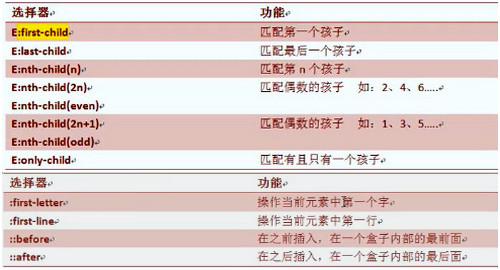
多重样式优先级
参考文章
插入样式表的方法有三种:
+ 外部样式表(External style sheet) +
内部样式表(Internal style sheet) +
内联样式(Inline style)
+ 行内样式(1000)> id选择器(100)> 类选择器(10)>
标签选择器(1)
1 | |
background(背景, 要设置宽高)
1 | |
Text(文本)
1 | |
Font(字体)
1 | |
链接
1 | |
列表
1 | |
盒子模型(上 右 下 左)
所有HTML元素可以看作盒子, 在CSS中,
"box model"这一术语是用来设计和布局时使用, CSS盒模型本质上是一个盒子, 封装周围的HTML元素, 它包括:边距,边框,填充, 和实际内容一个盒子的高度一般不用单独设置, 由其内容撑开 不要给元素添加具有指定宽度的内边距, 而是尝试将内边距或外边距添加到元素的父元素和子元素
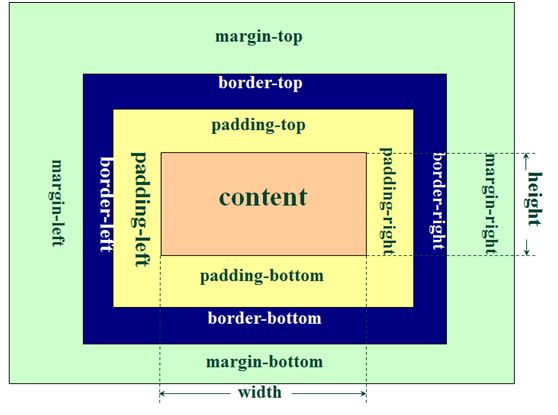
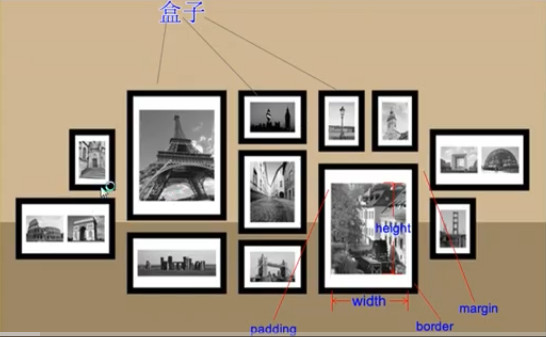
margin(外边距) - 清除边框外的区域, 外边距是透明的(盒子与盒子之间的距离)border(边框) - 围绕在内边距和内容外的边框padding(内边距) - 清除内容周围的区域, 内边距是透明的(内容填充, 内容到边框之间的距离)content(内容) - 盒子的内容, 显示文本和图像说明: margin 属性本意描述的兄弟与兄弟元素之间的关系, 若是父子元素关系, 就最好给其父元素加 padding 属性
margin 实现水平居中 > 元素要有固定的宽度(未设置, 为父元素100%的宽度), 只有块元素可以实现水平居中, 行内元素不能实现; 只有标准文档流中的盒子可以使用 margin 实现水平居中 > margin 属性是用来实现盒子的水平居中, 而不是文本的水平居中
注意: > 在标准文档流中垂直方向的 margin 值不会叠加, 仅仅会取比较大的值 > 水平方向没有 margin 的塌陷现象 > 浮动元素它是没有 margin 的塌陷现象的
几种属性
关于尺寸:
width && height(设置元素的宽高)
p{ height:100px; width:100px;}
line-height(设置元素的行高)
p{line-height: 14px;}
display(行内与块级相互转化) && visibility
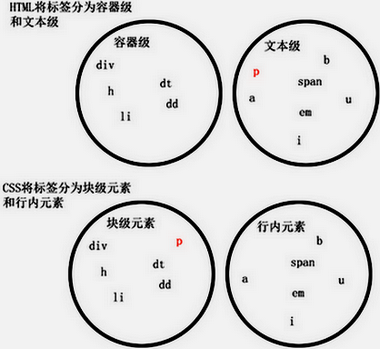
块级元素(block)特性: 总是独占一行, 表现为另起一行开始, 而且其后的元素也必须另起一行显示; 宽度(width), 高度(height), 内边距(padding)和外边距(margin)都可控制;
块级元素: div, h1, h2, h3, h4, h5, h6, hr, dl, ul, li, form, ol, p, pre, table
内联元素(inline)特性: 和相邻的内联元素在同一行; 宽度(width), 高度(height), 内边距的top/bottom(padding-top/padding-bottom)和外边距的top/bottom(margin-top/margin-bottom)都不可改变, 就是里面文字或图片的大小, 即宽高有内容撑开;
内联元素: a, img, br, input, select, small, span, strong, sub, sup, textarea,
1 | |
position(定位)
标准文档流: 从左至右, 从上至下; 遇到换行做空格解析; 高低不齐, 底部对齐 定位有四个属性值
1. static: 默认值, 即没有定位,
元素出现在正常的文档流中
1
2
3
4div.static {
position: static;
border: 3px solid #73AD21;
}
2. fixed:
元素位置相对于浏览器窗口是固定位置,即使窗口滚动也不会动,
与标准文档流无关, 层级比标准文档流元素高, 且不占据空间
1
2
3
4
5
6p.pos_fixed
{
position:fixed;
top:30px;
right:5px;
}
3. relative:
1)相对定位不脱标
2)相对定位不改变元素的性质, 不设置偏移属性, 位置不发生改变
3)相对定位元素的定位是相对于,
文档流中原先位置进行定位
4)元素会提升一个层级, 它原本所占的空间并不会改变
1
2
3
4
5
6
7
8
9
10h2.pos_left
{
position:relative;
left:-20px;
}
h2.pos_right
{
position:relative;
left:20px;
}
absolute:1)绝对定位改变元素的性质, 不设置偏移属性, 位置不发生改变
2)绝对定位脱离标准文档流, 定位的元素和其他元素重叠
3)绝对定位的元素的位置相对于”最近”的 已定位(无论是相对、绝对或固定)的父元素, 如果没有, 则它的位置相对于
(浏览器窗口)进行定位 1
2
3
4
5
6h2
{
position:absolute;
left:100px;
top:150px;
}
z-index 属性
z-index 表示层级大小, 数值大的会压盖数值小的, 默认为0 只有定位元素才有 z-index 值, 若多个定位元素未设置, 或者值相同, 则写在HTML后面的定位元素会压盖前面的的定位元素
float(浮动)
浮动的特点
> 1. 脱离文档流, 浮动的元素互相贴靠,
浮动元素有”字围”效果、收缩; > 2. 一旦元素浮动后, 即脱离文档流,
就不受文档流的控制了, 也就没有行内、块级之分了; > 3.
行内元素能够支持宽高, 但浮动元素未设置宽高,
其宽高由内容撑开;
浮动清除的方法:
> 经过浮动的元素, 会影响到它下面元素的布局,
浮动元素的父元素没有将浮动元素包裹 > 1.
给浮动元素的父级元素加高度: 如果一个元素要浮动,
那么它的父级元素一定要有高度, 保证父级高度不能小于子级高度,
有高度的盒子, 才能包住浮动的子元素; > 2.
追加一个空元素并添加clear: both;:
(该元素的左右两侧都不能有浮动元素),
但是这种方法有一个非常大的、致命的问题, 它所在的标签,
“margin属性失效了”, margin失效的本质原因是: 父级高度为零. > 3.
在最后的浮动元素增加<div class="clear></div>,
并clear: both; > 4. 在父元素上添加:
overflow: hidden;
1 | |
transform (2D效果)
通过CSS3 转换, 可以实现对元素的移动、缩放、转动、拉长或拉伸
移动:translate(10px,30px)/旋转:rotate(40deg)/缩放:scale(2,4)/倾斜:skew(30deg,20deg)/矩阵:matrix()
transform (3D效果)
rotateX() rotateY() rotateZ()
transition (过度)
CSS3 过度是元素从一种样式逐渐改变为另一种的效果 目标属性、时长
1 | |
@keyframes (animation)
在 @keyframes 中规定某项 CSS 样式, 可以创建由当前样式逐渐改为新样式的动画效果 动画名称、动画时长
1 | |
待续…