搭建个人博客
2019-06-08-搭建博客
基础搭建
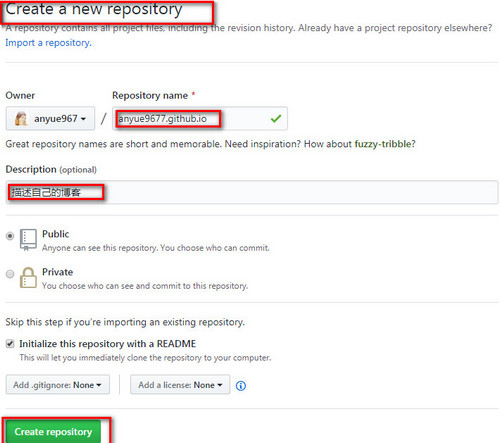
创建一个仓库,用于存放个人博客文件
在Github首页右上角头像左侧加号点选择 New repositor(新存储库)或点击这里进行创建一个仓库.
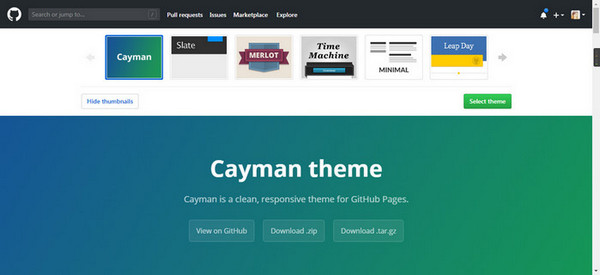
开启Github Pages

进入仓库设置项,进行主题的选择
Hexo 的搭建
Hexo是一个简单、快速、强大的基于 Github Pages 的博客发布工具,支持
Markdown格式,有众多优秀插件和主题。
安装 Node.js
Linux/类Linux下利用nvm安装Node比较好,https://github.com/nvm-sh/nvm
1 | |
Windows下nvm安装配置,https://github.com/coreybutler/nvm-windows
nvm 安装好后,利用 nvm 相关命令安装node.js
参考配置 nvm
参考cnblog博客
配置nvm安装目录下的 settings.txt
1
2
3
4
5
6$ root: F:\Design\nvm
$ path: F:\Design\nodejs
$ arch: 64
$ proxy: none
$ node_mirror: https://npmmirror.com/mirrors/node/
$ npm_mirror: https://npmmirror.com/mirrors/npm/配置用npm下载包时全局安装的包路径
1
2$ npm config set prefix “F:\Design\nvm\npm”
$ %NPM_HOME%=F:\Design\nvm\npm配置国内仓库
1
$ npm install -g cnpm --registry=https://registry.npmmirror.com
:link:淘宝Npm镜像
nvm 命令
| 命令 | 说明 |
|---|---|
| nvm arch 32/64 | 显示Node是以32位还是64位模式运行 |
| nvm install |
下载需要的Node版本,默认64位 |
| nvm list [available] | 列出node.js安装,在末尾输入可用的类型以显示可供下载的版本列表 |
| nvm on | 启用版本管理 |
| nvm off | 禁用版本管理 |
| nvm proxy [url] | 设置代理,留空以查看当前代理,设置为“none”以删除代理 |
| nvm uninstall |
卸载指定版本 |
| nvm use |
使用指定Node版本,可以指定位数 |
| nvm root [path] | 设置nvm应存储不同版本node.js的目录 |
| nvm version | 显示当前的 nvm 版本 |
| nvm node_mirror |
Set the node mirror(China) |
| nvm npm_mirror |
– |
安装 Hexo
Hexo官方参考文档
1
2
3
4
5
6
7
8
9
10
11
12
13
14
15
16
17
18$ npm install -g hexo-cli
$ hexo init <folder> // 必须为空目录
$ cd <folder>
$ npm install
.
├── _config.yml
├── package.json
├── scaffolds
├── source
| ├── _drafts
| └── _posts
└── themes
$ hexo new [layout] <title> # hexo new "post title with whitespace"
$ hexo g # generate 网页文件
$ hexo s # server https://localhost:4000 预览网页
$ hexo clean
$ hexo d # deployer push 到仓库
配置优化Hexo(命令都是在博客主目录执行)
配置_config.yml
:link:参考配置
#### 安装hexo-deployer-git扩展 1
2
3
4
5
6$ npm install hexo-deployer-git --save
deploy:
type: git
repo: git@github.com:anyue967/anyue967.github.io.git
branch: master
添加插件
1 | |
:link:参考官方 live-2d配置文件
1 | |
1 | |
npm (Nodejs Package Manager)相关命令
| 命令 | 说明 |
|---|---|
| npm -v | 查询node版本 |
| npm install xx -g | 全局安装模块,如:gulp@3.9.1 |
| npm install xx –save | 本地安装模块并写入 json配置 |
| npm search xx | 搜索模块 |
| npm outdated | 过时模块 |
| npm update xx | 更新模块 |
| npm search xx | 搜索模块 |
| npm cache clear | 清空本地缓存 |
| npm uninstall xx | 卸载模块 |
| npm list -g | grep xx | 查找全局安装模块 |
| npm list xx | 查看模块版本号 |
1 | |
1 | |
nrm 的安装和使用
1 | |