Ansible
2019-08-28-Ansible
Ansible
前话
IAAS(Infrastucture as a Service) ‘’基础设施即服务’’
PAAS(Platform as a Service) ‘’平台即服务’’
SAAS(Service as a Service) ‘’软件即服务’’
简介
ansible是新出现的
自动化运维工具,基于Python开发,集合了众多运维工具(puppet、cfengine、chef、func、fabric)的优点,实现了批量系统配置、批量程序部署、批量运行命令等功能。
ansible是
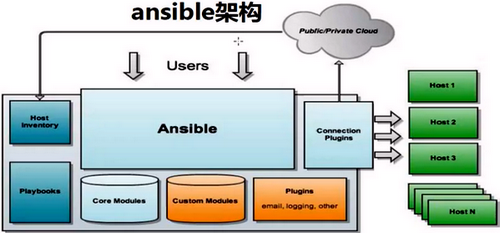
基于模块工作的,本身没有批量部署的能力。真正具有批量部署的是ansible所运行的模块,ansible只是提供一种框架。主要包括:
(1)connection plugins:负责和被监控端实现通信;
(2)host inventory:指定操作的主机,是一个配置文件里面定义监控的主机;
(3)各种模块核心模块、command模块、自定义模块; (4)借助于插件完成记录日志邮件等功能;
(5)playbook:剧本执行多个任务时,非必需可以让节点一次性运行多个任务。
架构与原理
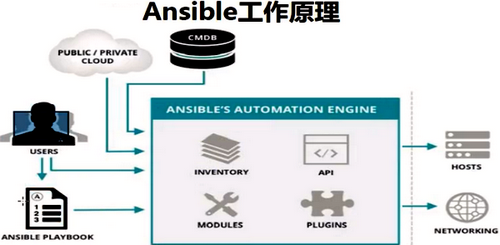
ansible 通过
ssh实现配置管理、应用部署、任务执行等功能
安装:
RPM 方式
1 | |
Git 方式
1 | |
相关文件
配置文件
1
2
3/etc/ansible/ansible.cfg # 主配置文件
/etc/ansible/hosts # 主机清单
/etc/ansible/roles # 存放角色程序
1
2
3
4
5
6
7/usr/bin/ansible # 主程序
/usr/bin/ansible-doc # 帮助文档
/usr/bin/ansible-galaxy # Download/Upload Role Module
/usr/bin/ansible-playbook # 定制自动化任务编排剧本工具
/usr/bin/ansible-pull # 远程执行命令工具
/usr/bin/ansible-vault # 文件加密tool
/usr/bin/ansible-console # Terminal Tool
基本使用
ansible [options]
1 | |
命令
| 命令 | 选项 | 说明 |
|---|---|---|
ansible-doc |
-a | 显示所有模块文档 |
| – | -l,--list |
列出可用模块,也可以指定模块 |
| – | -s,--snippet |
指定模块playbook片段 |
ansible |
-m | 指定模块,默认command模块 |
| – | -a | 传递命令 |
| – | -k,--ask-pass |
提示输入ssh密码,默认Key验证 |
| – | –list | 显示主机 |
| – | -C,--check |
测试执行过程 |
ansible-galaxy |
list | 列出所装角色 |
| – | info | 角色信息 |
| – | remove | 删除角色 |
ansible-pull |
– | 推送命令至远程 |
ansible-playbook |
-C | 检查,不执行 |
| – | --limit hosts |
在指定主机执行 |
| – | --list-hosts |
列出运行任务的主机 |
ansible-vault |
encrypt | 加密playbook |
| – | decrypt | |
ansible-console |
– | – |
1 | |
Host-pattern
all:
1
ansible all -m ping*:1
ansible "*" -m ping与或非关系:
1
2
3ansible 'dbser:webser' -m ping # 或
ansible 'dbser:&webser' -m ping # 与
ansible 'dbser:!webser' -m ping # 非
常见模块
文件类操作模块
copy file blockinline lineinfile find replace fetch
1.copy
选项: src dest force backup owner group mode 1
2
3ansible all -m copy -a 'src=/root/ansible/selinux dest=/etc/selinux/config backup=yes'
ansible all -m copy -a 'src=/etc/shadow dest=/data/ mode=000 owner=xy'
ansible all -m copy -a 'content="hello\world\n" dest=/data/f2 backup=yes mode=755 owner=root'
2.file(path,dest,name)
选项: path state src force owner group mode recurse
1
2
3ansible dbsrv -m file 'path=/root/a.sh owner=xy mode=755'
ansible dbsrv -m file 'src=/etc/fstab dest=/data/fstab-link state=link'
ansible dbsrv -m file 'path=/home/state/test te=directory owner=xy group=xy recuser=yes'
3.blockinfile: 在指定的文件中插入”一段文本”
选项: path block marker state insertafter insertbefore backup
create
1
2ansible dbsvr -m blockfile -a 'path=/test/rc.local block="systemctl start mariadb\nsystemctl start httpd" marker="#{mark} service to start"'
ansible dbsvr -m blockfile -a 'path=/test/rc.local marker="#{mark} service to start" state=absent'
4.lineinfile:
选项: path line regexp state backrefs inserafter insertbefore backup
create 1
2
3# 确保某一行文本存在指定的文件中,若存在不做任何操作,默认在文件的末尾插入这行文本
ansible dbsvr -m lineinfile -a 'path=/test/test.txt regexp="^line" line="test text"'
ansible dbsvr -m -m lineinfile -a 'path=/test/test.txt regexp="(H.{4}).*(H.{4})" line="\2" backrefs=yes'
5.find
选项: path recurse hidden file_type patterns
use_regex contains age(s m h d w)
age_stamp(atime ctime mtime) size(t g m k b) get_checksum
1
2ansible dbsvr -m find -a 'path=/test patterns="*.sh" file_type=any hidden=yes'
ansible dbsvr -m find -a 'path=/test age=-4d age_stamp=atime recurse=yes' # 4天以内
6.replace
选项: path regexp replace backup 1
ansible dbsvr -m replace -a 'path=/test regexp="ASM" replace=asm backup=yes'
7.fetch(远程单个文件,可以先tar)
1 | |
命令类操作模块
command shell script
1.command(默认)
选项: free_form chdir creates removes 1
2
3
4# 该模块不支持`$、<、>、|、;、&`等
ansible dbser -m command -a 'chdir=/data/f1.sh'
ansible dbser -a 'echo 123456 |passwd --stdin user1' # fail
ansible dbuser -k all -m command -a "ping -c 1 www.baidu.com"
2.shell
选项: free_form chdir creates removes executable
1
ansible dbser -m shell -a 'cat /etc/passwd |awk -F: {print $1,$2}' &>/tmp/test.txt
3.script
选项: free_form chdir creates removes
1
2
3#!/bin/bash
echo "hostname is $HOSTNAME"
ansible all -m script -a '/root/ansible/host.sh'
系统类模块
cron service user group hostname yum setup synchronize debug yum_repository
1.cron
选项: minute hour day month weekday
special_time user job name
state disabled backup
1
2
3
ansible all -m cron -a 'minute=* weekday=1,3,5 job="/usr/bin/wall FBI warnning" name=broadcast'
ansible all -m cron -a 'disabled=true job="/usr/bin/wall FBI warnning" name=broadcast'
ansible all -m cron -a 'job="/usr/bin/wall FBI warnning" name=broadcast state=absent'
2.service
选项: name state enabled 1
ansible dbsvr -m service -a 'name=vsftpd state=started/stopped/reloaded/restarted enabled=true'
3.user
选项: name group gourps append shell uid
expires(指定用户过期时间) comment state
remove password update_passowrd(always on_create)
generate_ssh_key ssh_key_file ssh_key_passphrase ssh_key_type
1
2ansible dbsvr -m user -a 'name=nginx shell=/sbin/nologin system=true home=/usr/local/nginx groups=root,bin uid=80 comment="nginx service"'
ansible dbsvr -m user -a 'name=nginx state=absent remove=true'
4.group
选项: name state gid
1
2
3
ansible dbsvr -m group -a 'name=nginx system=true gid=80'
ansible dbsvr -m -a 'getent group nginx'
ansible dbsvr -m group -a 'name=nginx state=absent'
5.hostname
1 | |
6.yum_repository && yum
选项: name baseurl description file enabled gpgcheck gpgcakey
state
1
2ansible dbsvr -m yum_repository -a 'name=AliEpel description="alibaba EPEL" baseurl=https://mirrors.aliyun.com/epel/$releasever\Server/$basearch/'
ansible dbsvr -m yum_repository -a 'name=local baseurl=file://media description="local cd yum" enabled=no'
选项: name state disable_gpg_check enablerepo disablerepo
1
2
3
4ansible dbsvr -m yum -a 'name=vsftpd,httpd state=installed'
ansible dbsvr -m yum -a 'name=vsftpd,httpd state=removed'
ansible dbsvr -m yum -a 'list=installed'
ansible dbsvr -m yum -a 'name=dstat update_cache=yes'
7.setup(内部变量)
1 | |
8.synchronize(目录文件同步,基于rsync命令工具)
1 | |
9.debug
1 | |
ansible-playbook
PlayBook 是由一个或多个”play”组成的列表,play的主要功能是为Ansible中的task定义好角色–指定剧本对应的服务器组;task是一个任务,调用Ansible各种模块,将多个play组织在一个PlayBook剧本中,组成非常完整的流程控制集合。
剧本 <–task <–modules
Usage
1 | |
语法
在YAML语法中,
---表示文档开始,-作为开头也表示一个块序列的节点; 列表 - 字典 key: value 或者 { key1: value1, key2: value2, …}
Ansible的幂等性: 幂等性能够
保持重复执行一项操作时,得到的结果是相同的,ansible是以“结果为导向的”,指定一个状态,ansible会自动判断,“当前状态”是否一致,如果一致,则不进行任何操作,不一致将当前状态变为目标指定状态。
key: value 可同行写也可换行写, 值可是字符串,也可是列表;
基础
1 | |
handler && notify || tags
1 | |
var 变量
1 | |
Template(Jinja2)
when
1 | |
循环
1 | |
for
1 | |
if
1 | |